







Skip to Content

Run the Floor

Everything that happens between a customer walking in and the table going dark: tables and timers, the kitchen and its stock, bookings and rentals, and the staff who work the shift.

See It First

The real screens for everything on this page, before a word of description. Every capability below is one of these.

Real screens, shown with sample club data.

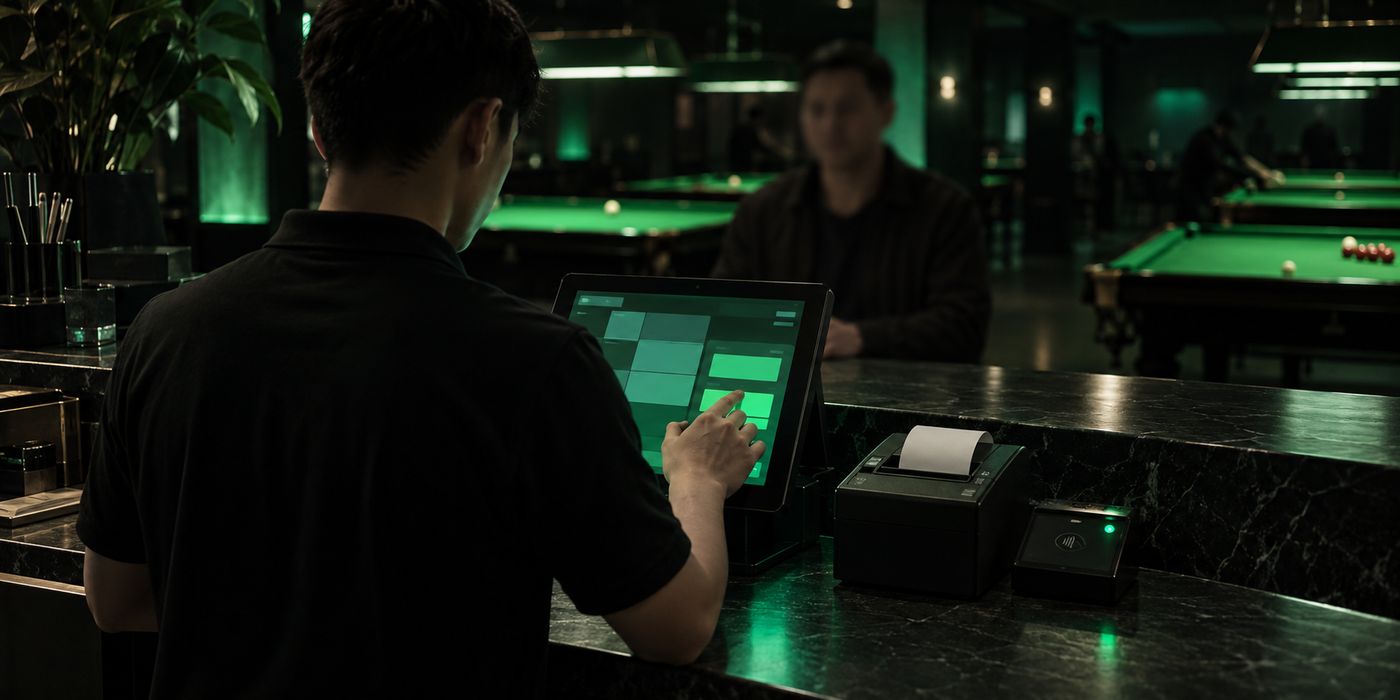
On the counter screen

Tables

4 screens

What it does

Kitchen

1 screen

What it does

Bookings

2 screens

What it does

Staff

2 screens

What it does

On the Owner’s Phone

The operator web app: the same floor, the same money and the same staff as the counter screen, sized for one hand and carried off the premises.

Real screens, shown with sample club data.

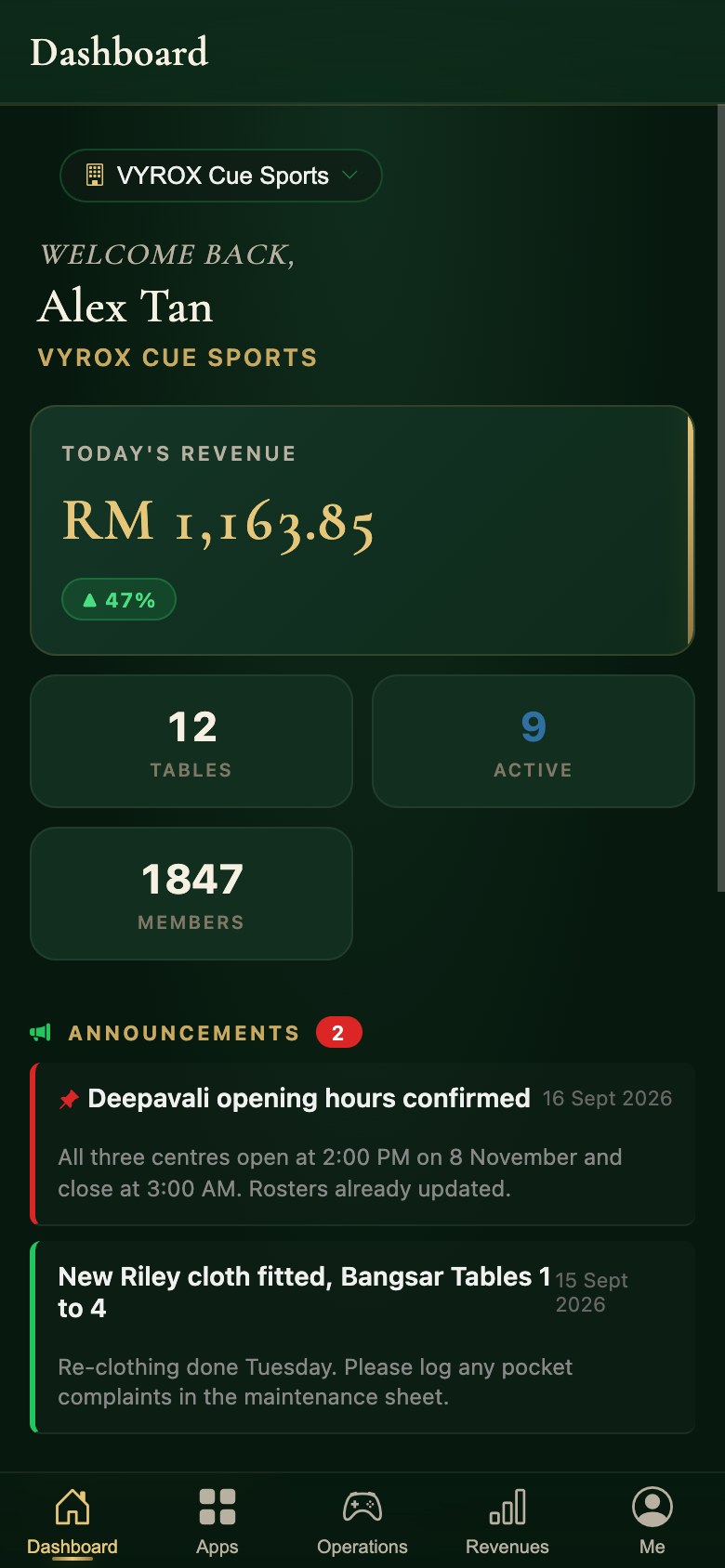
  1. The Snooker King operator app: today’s takings, tables open and member count on one dashboard

    01Open the day on the dashboard

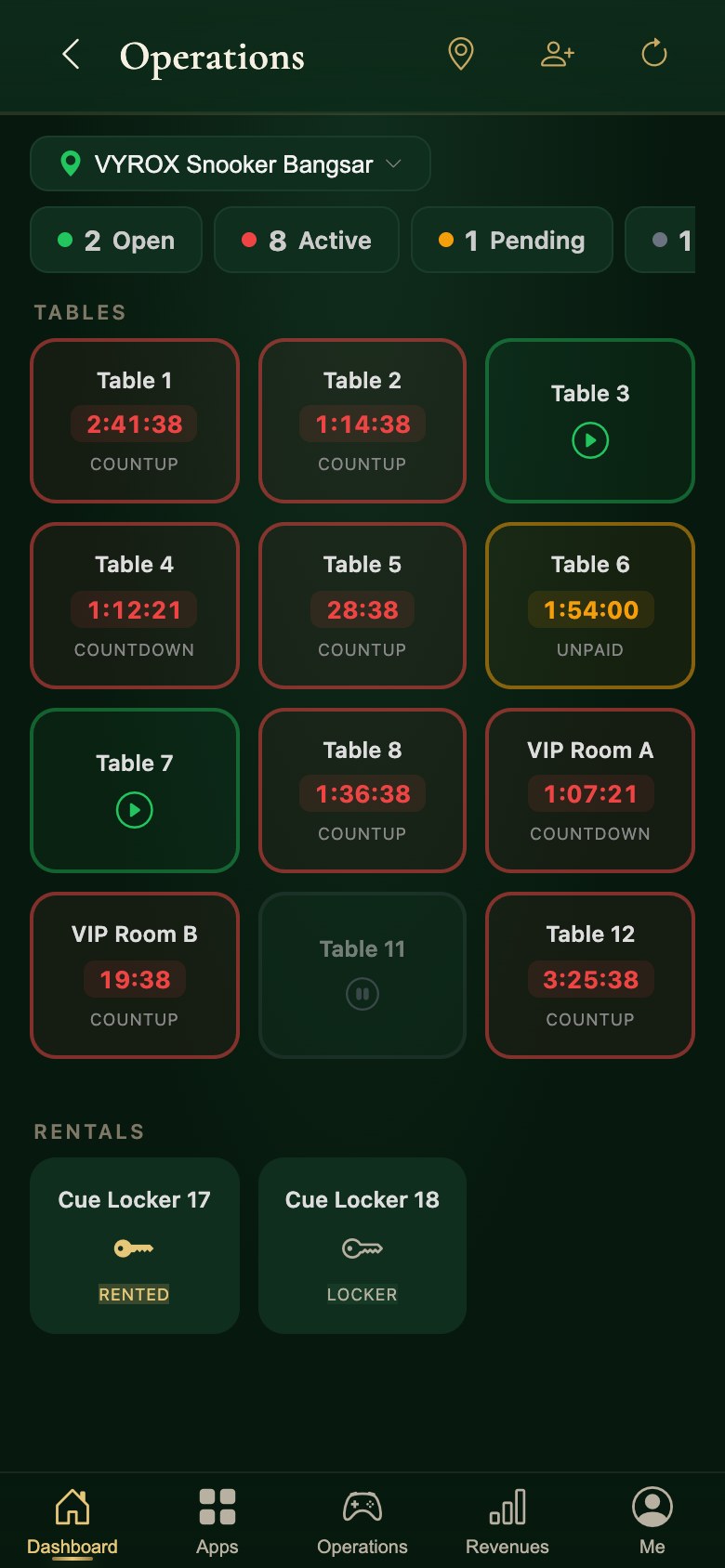
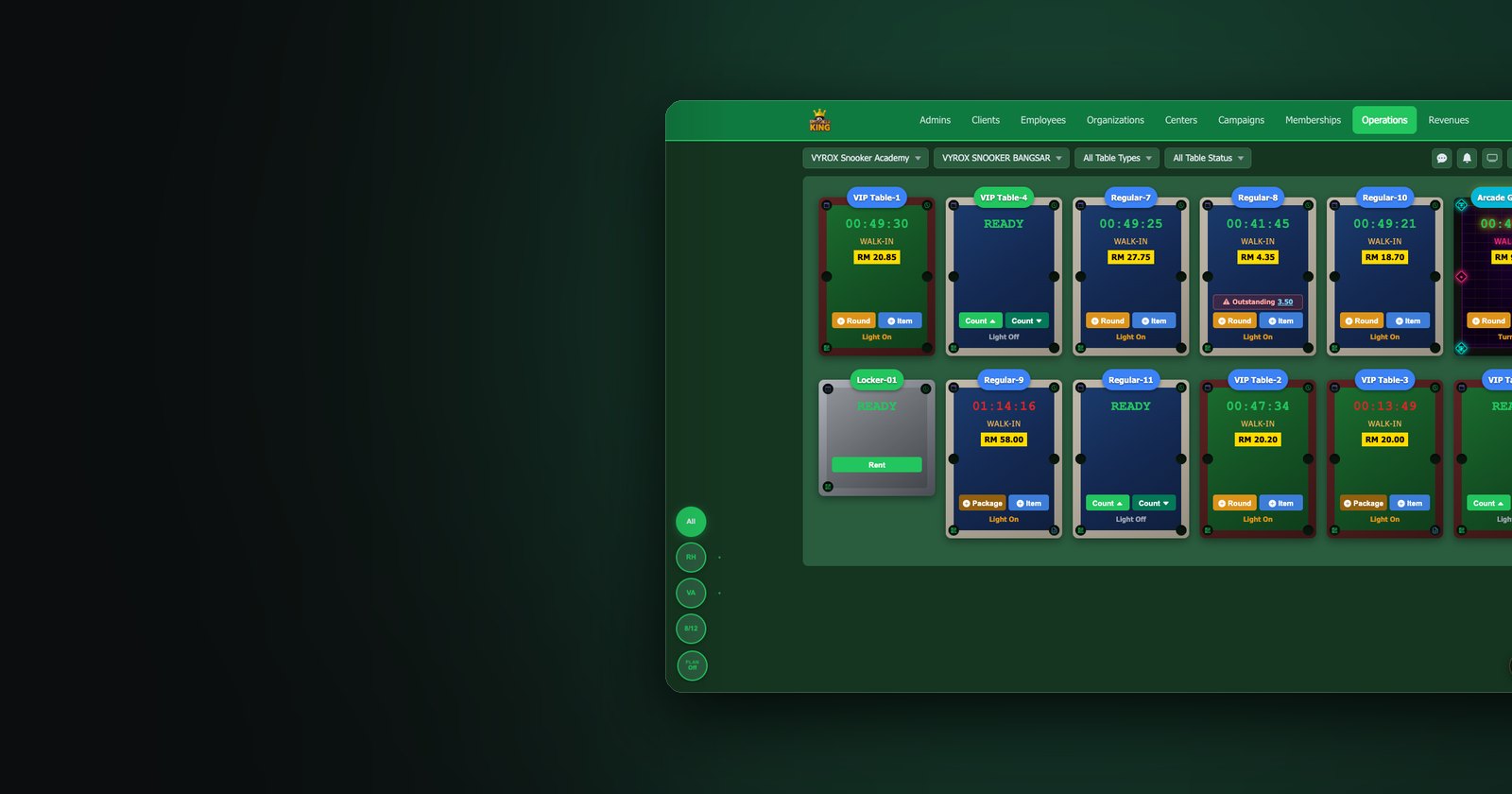
  2. The live table floor in the Snooker King operator app: every table with its timer and running spend

    02See the floor from anywhere

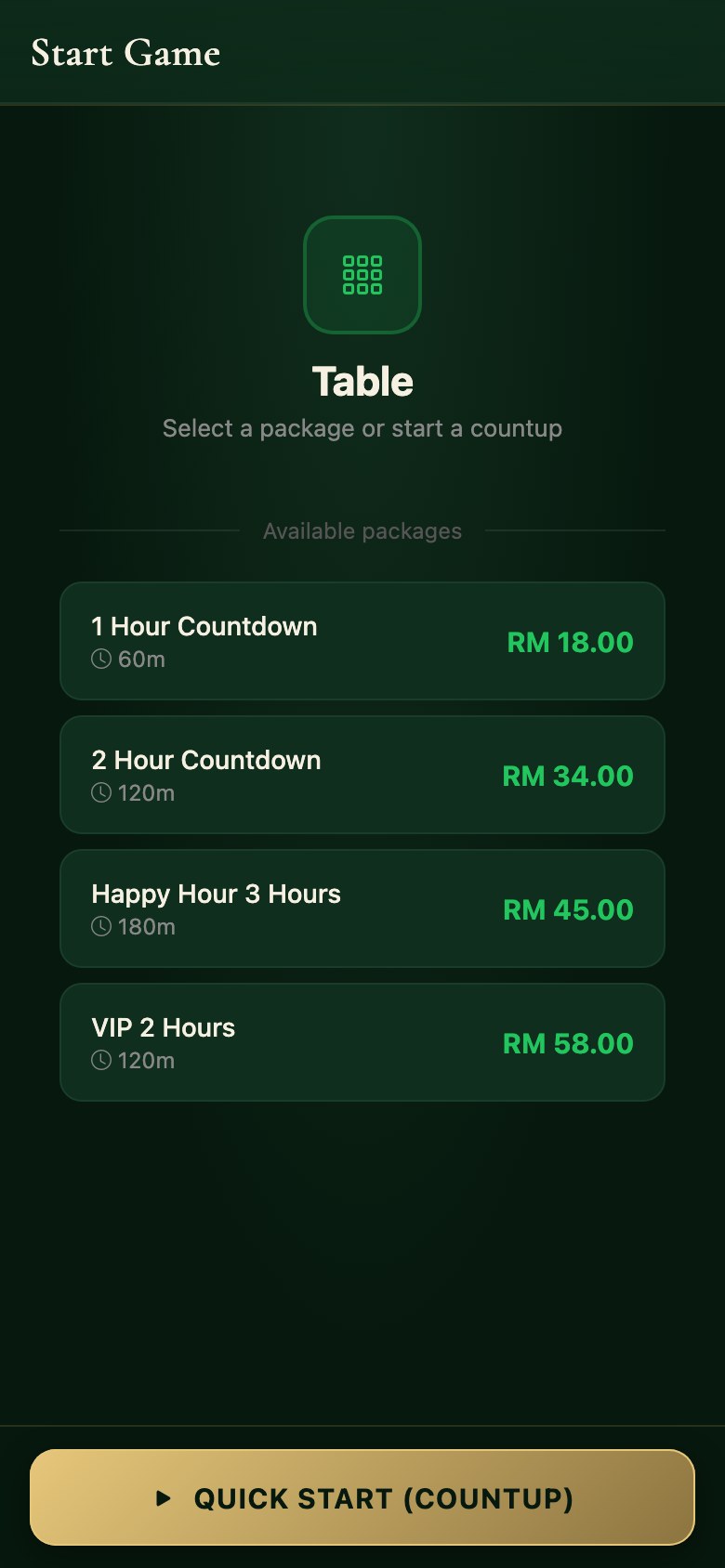
  3. Starting a table in the Snooker King owner app: pick a countdown package or begin an open count-up

    03Start the table, on a package or the clock

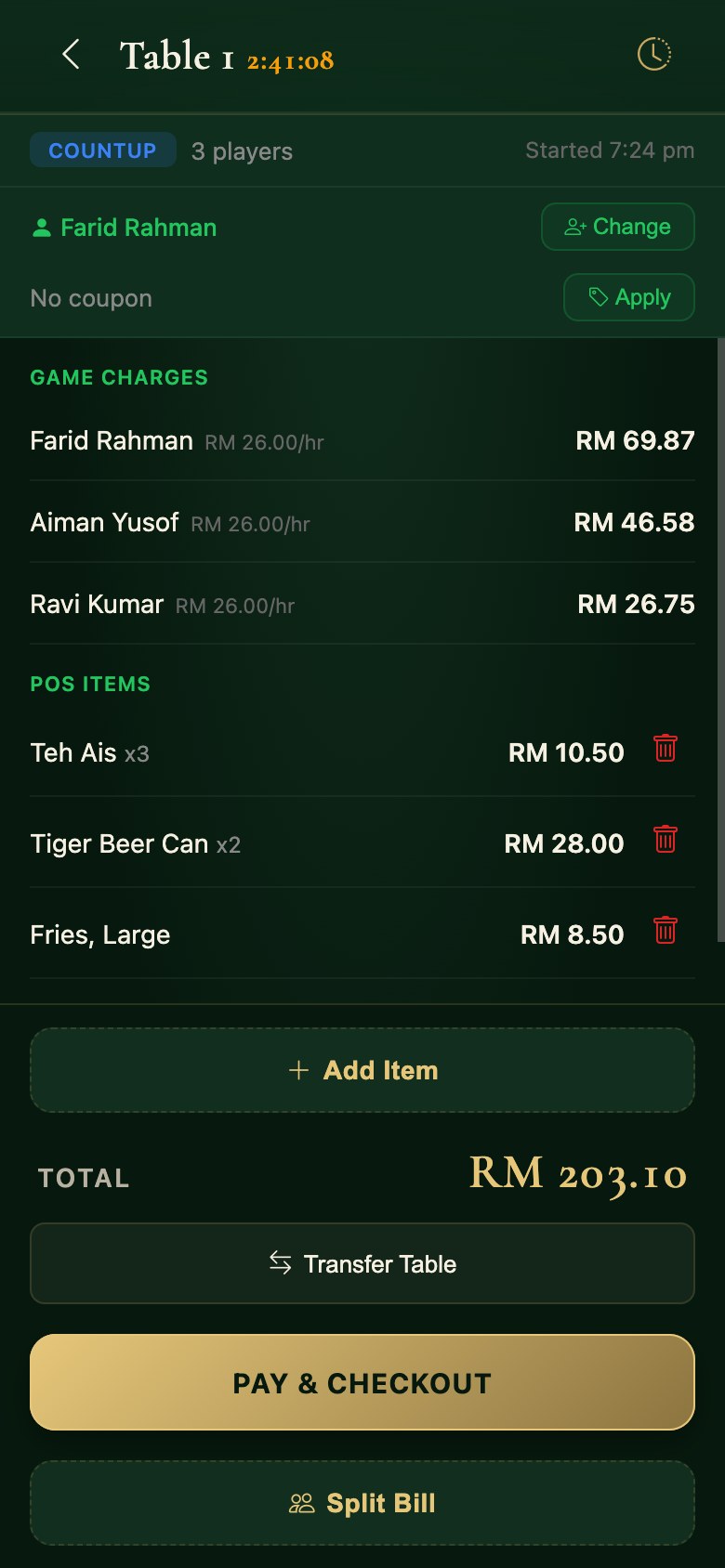
  4. A table session in the Snooker King operator app: game charges and food lines on one bill

    04Open a table’s bill

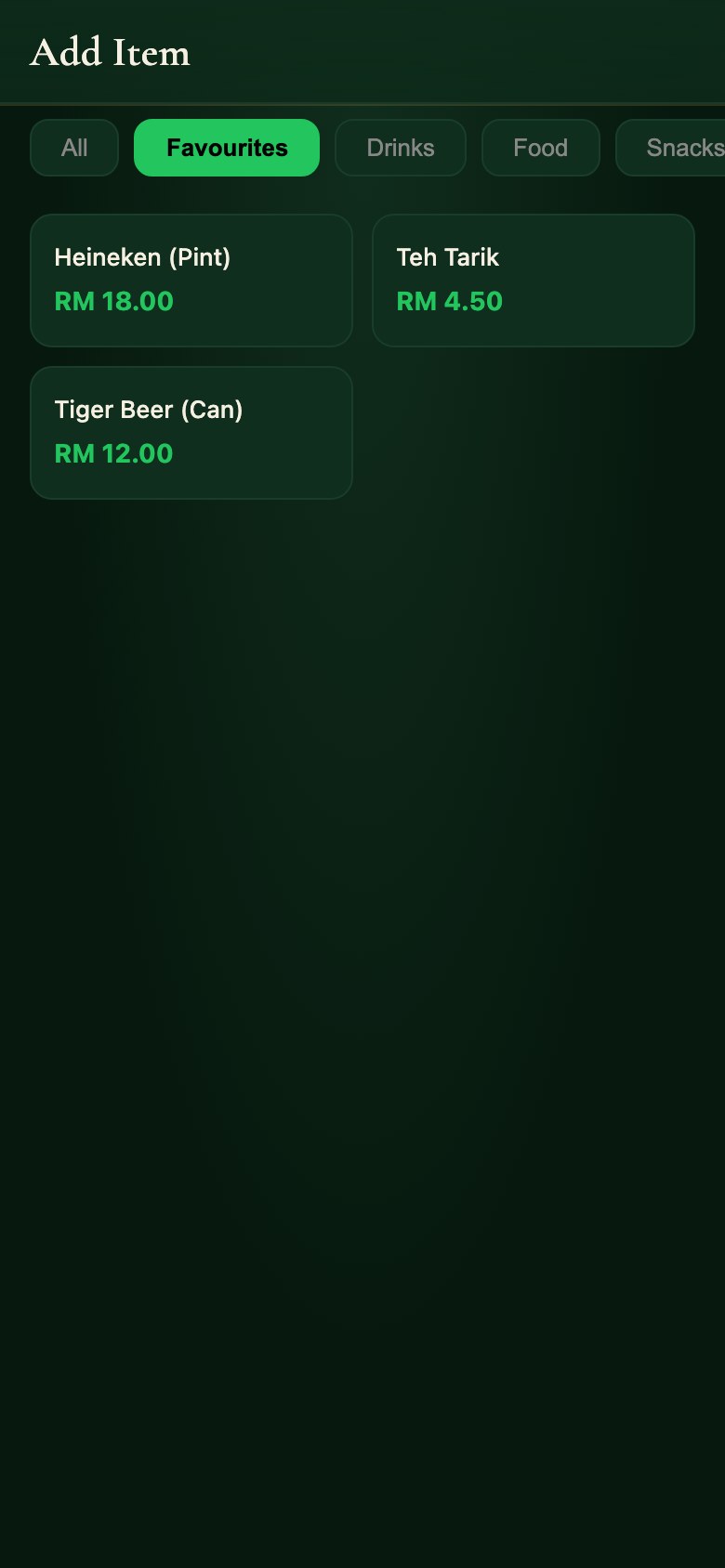
  5. Adding food and drink to a running table in the Snooker King owner app, from the same item list the counter uses

    05Add the drinks to the table

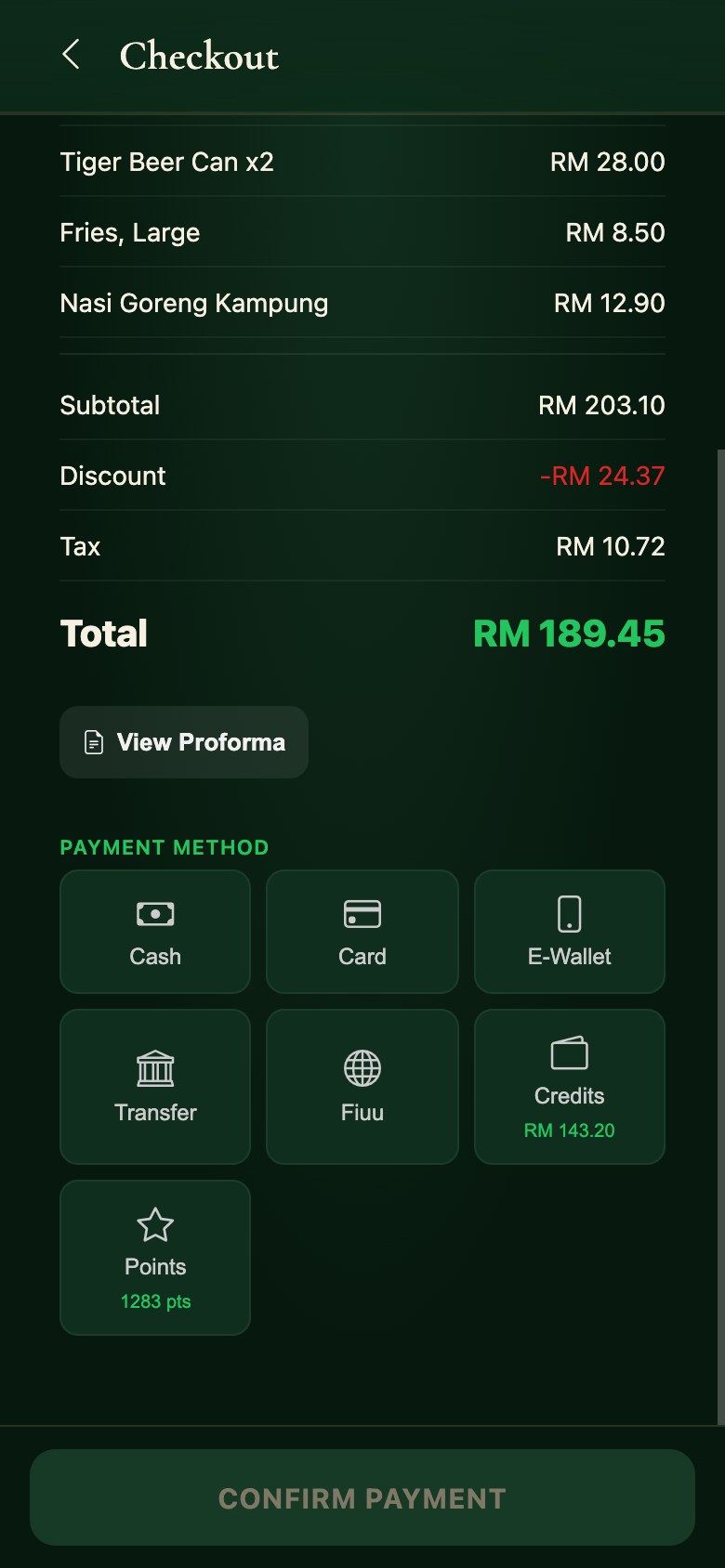
  6. Checkout in the Snooker King operator app: discount, tax, total and every tender the club accepts

    06Take the payment

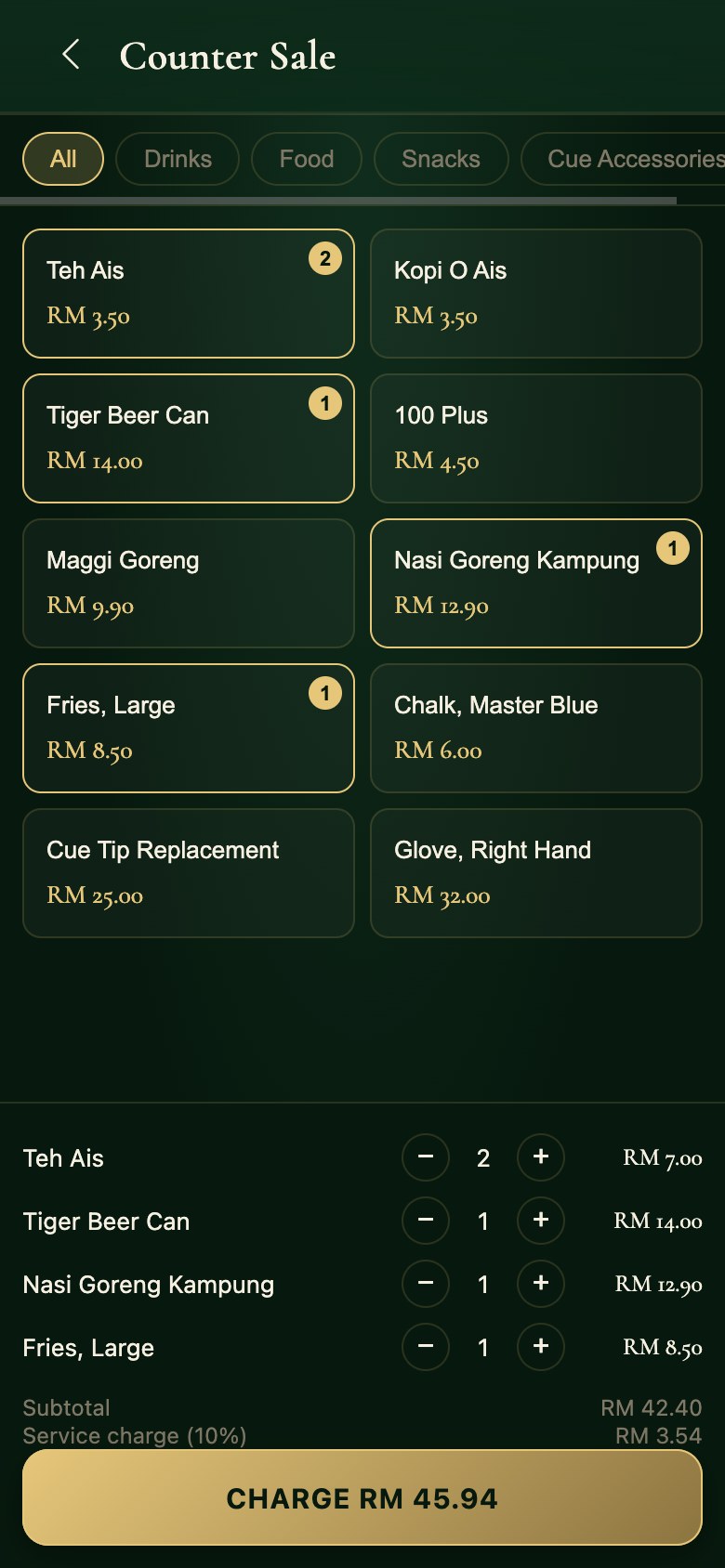
  7. A counter sale in the Snooker King operator app, with the cart and the service charge

    07Ring up a counter sale

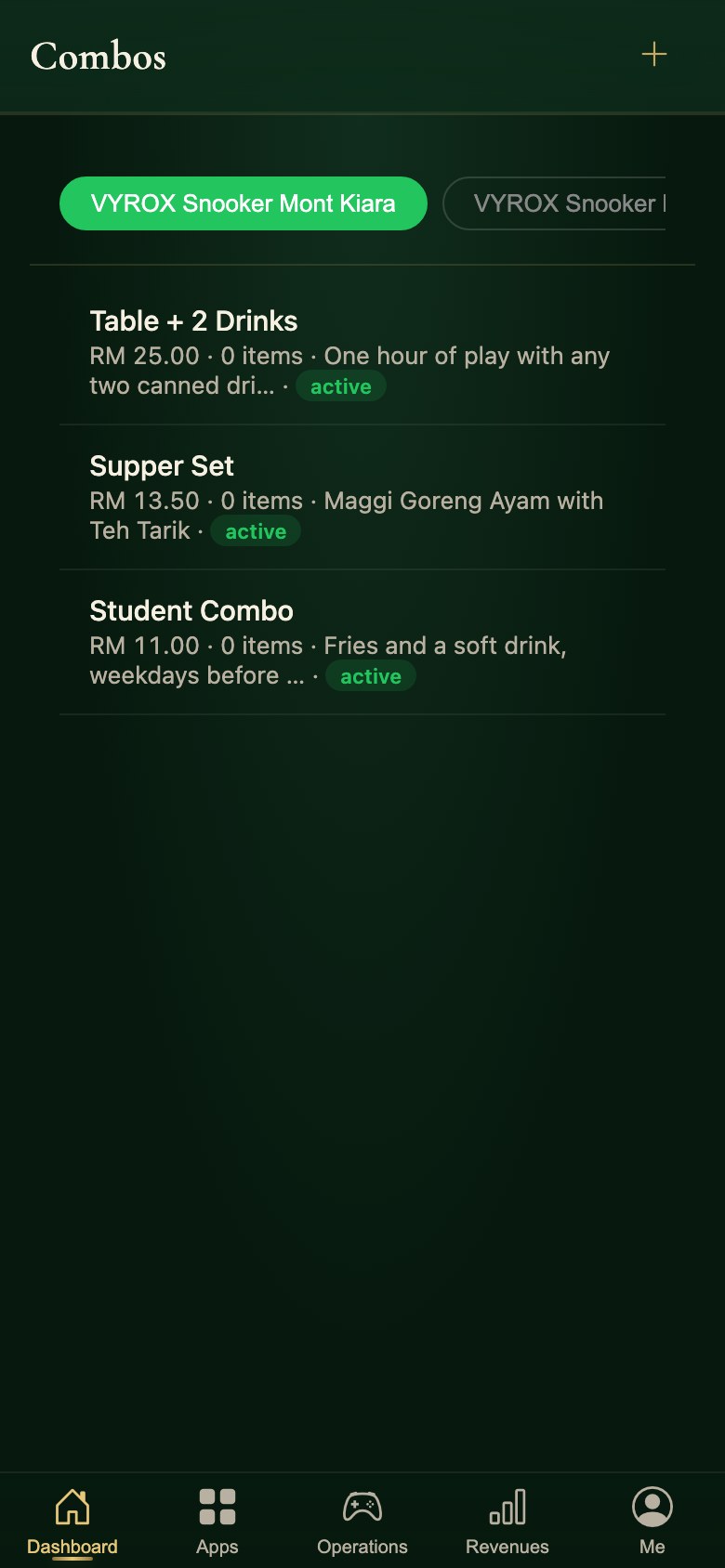
  8. Combo deals in the Snooker King owner app: a set of items sold together at one price, with the items each combo contains

    08Sell a combo at one price

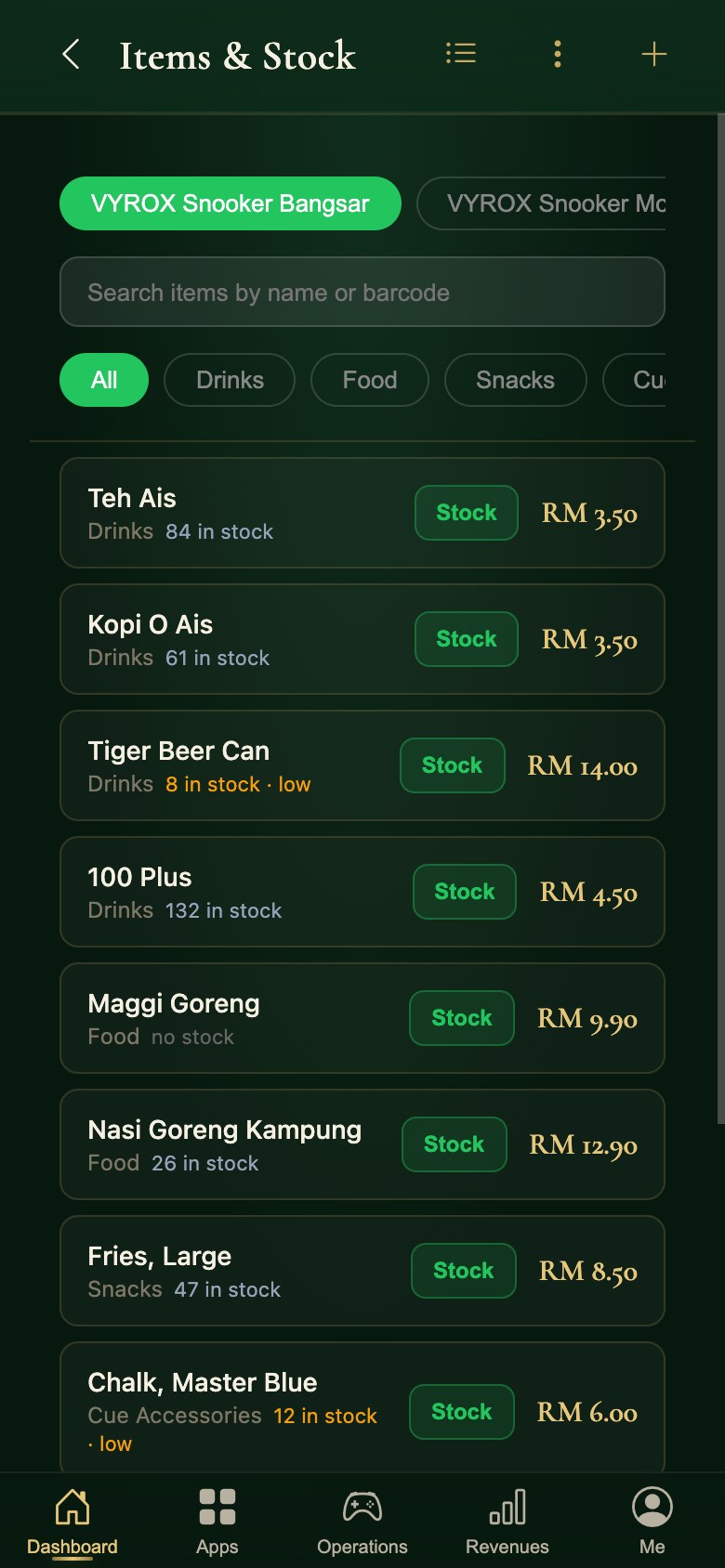
  9. Items and stock in the Snooker King operator app, with low-stock warnings on the line

    09Watch stock as it sells

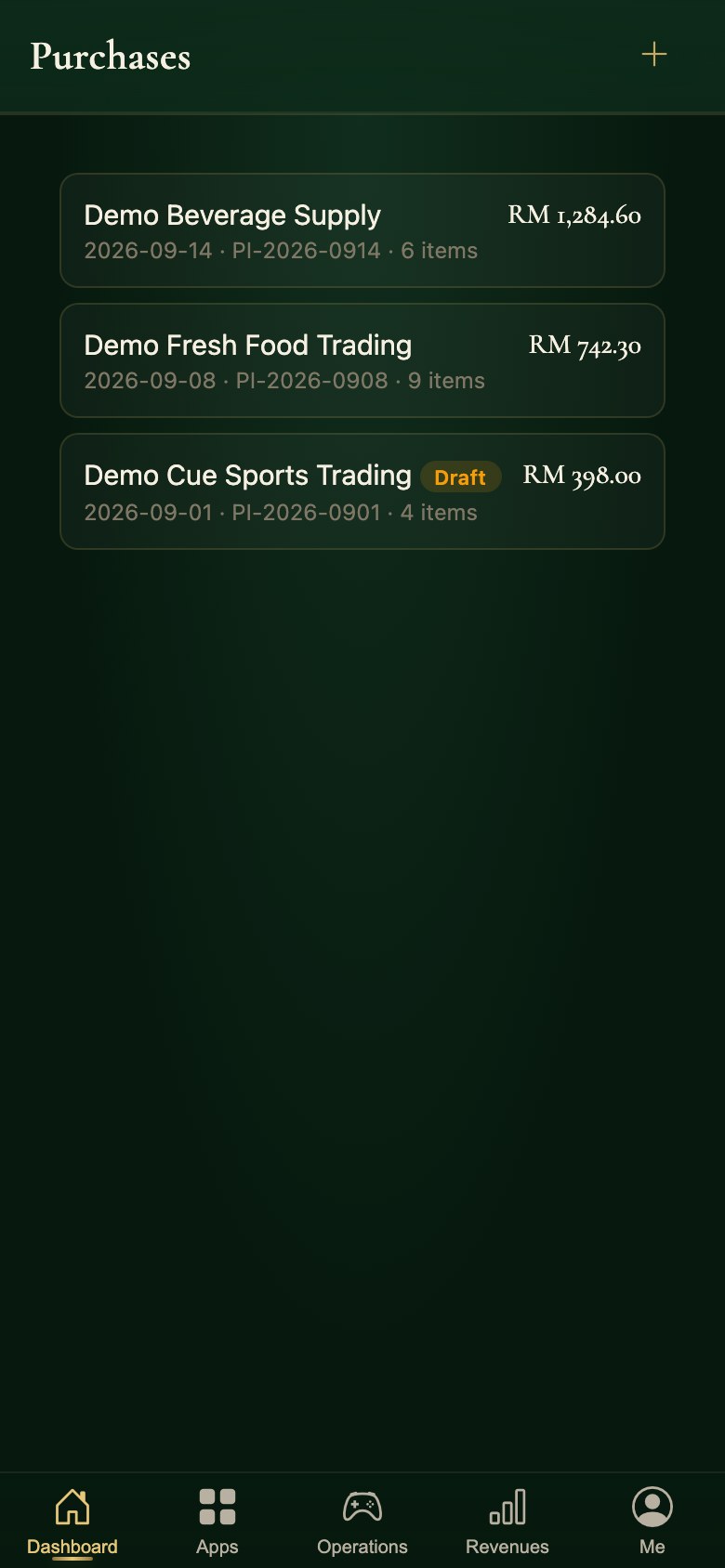
  10. Purchase invoices in the Snooker King owner app: what each supplier delivered, on what date, at what total

    10Book in what the supplier delivered

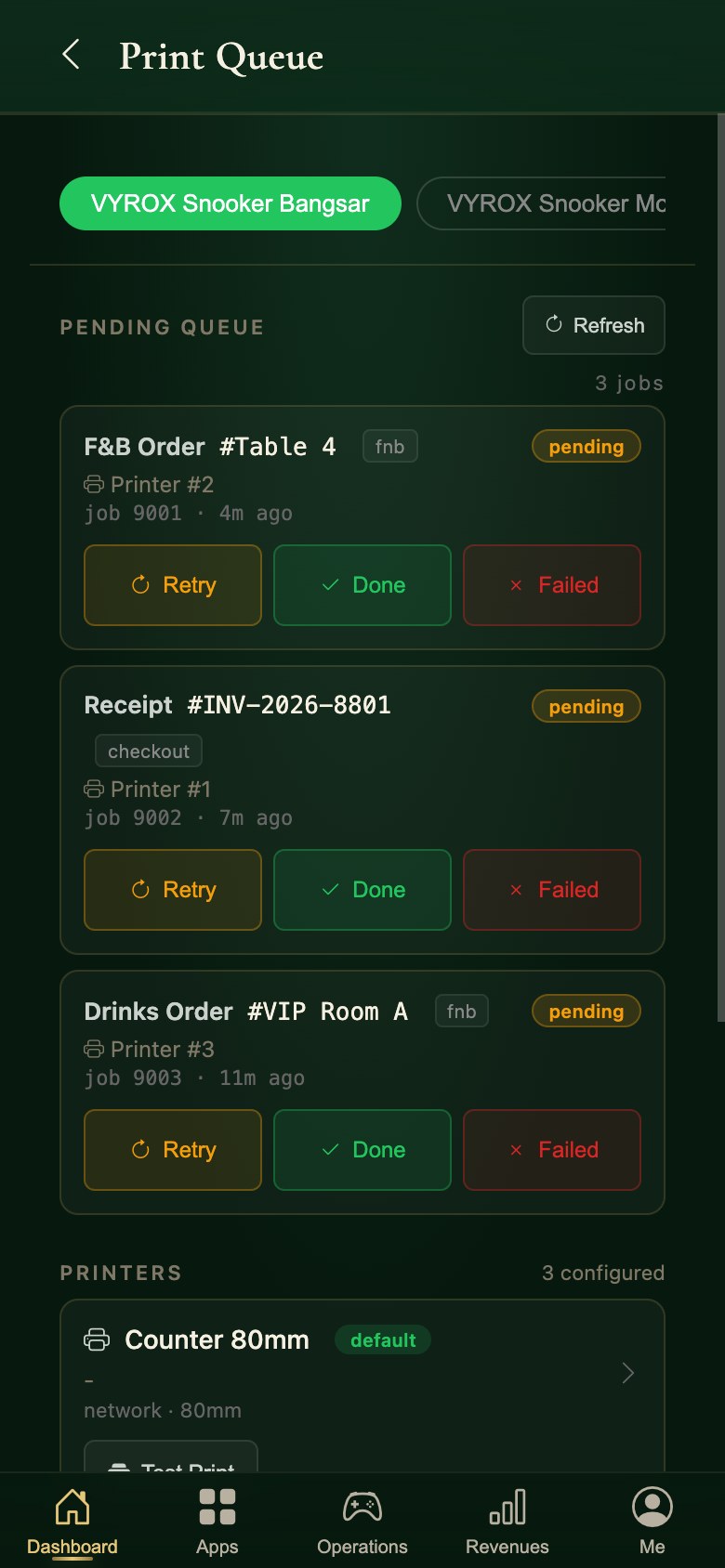
  11. The print queue in the Snooker King operator app: pending jobs and the printers behind them

    11Keep the printers honest

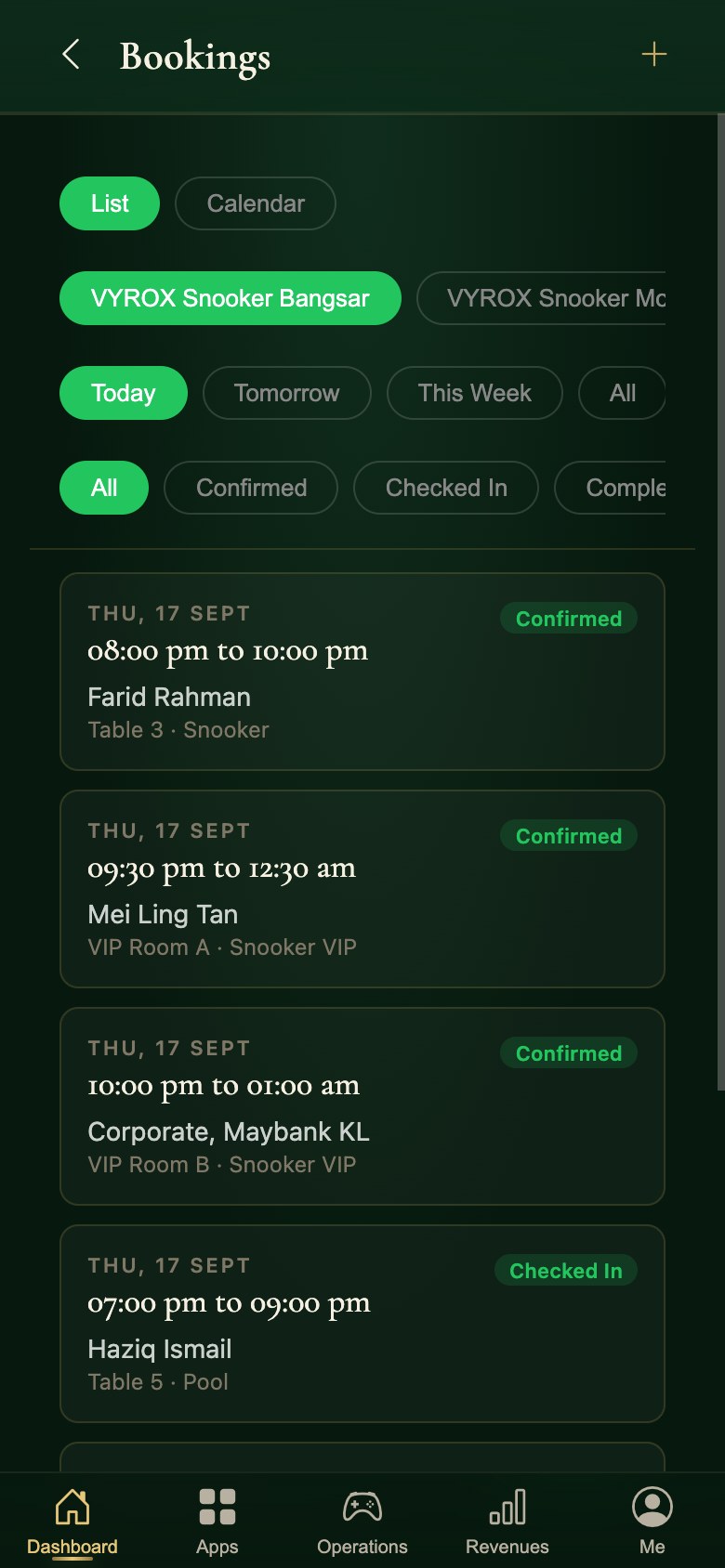
  12. Today’s bookings in the Snooker King operator app, each with its table and status

    12Work today’s bookings

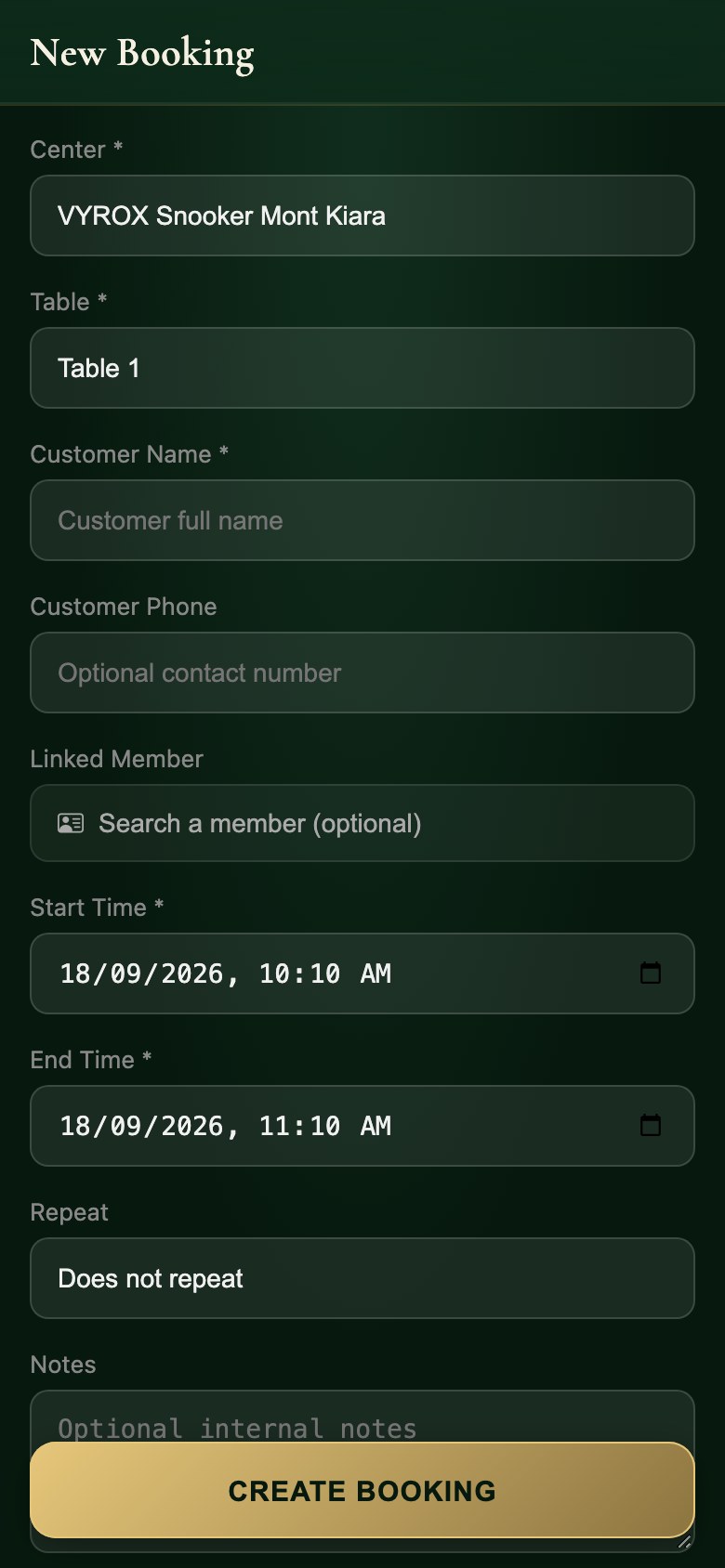
  13. Taking a booking in the Snooker King owner app: the centre, the table, the date and the time on one form

    13Take a booking at the counter

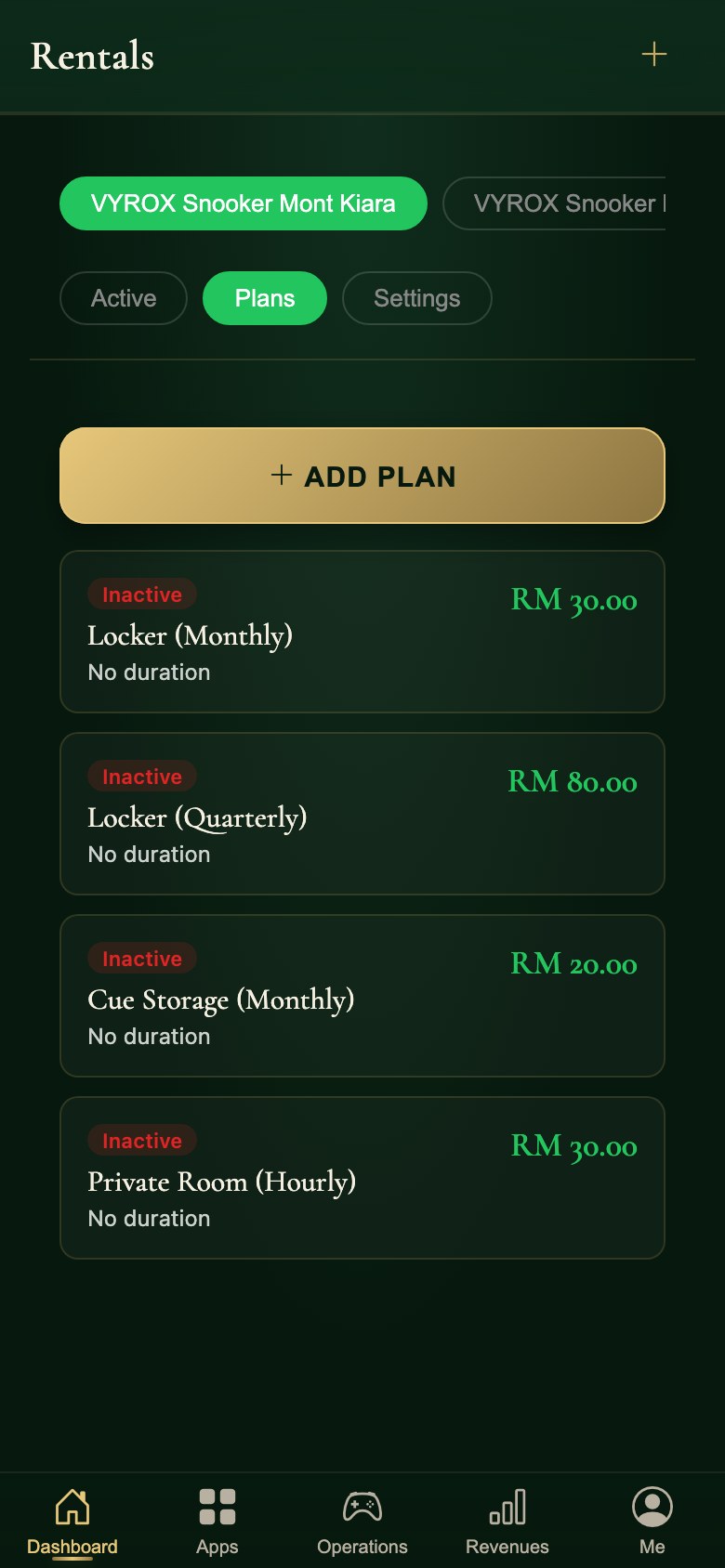
  14. Rental plans in the Snooker King owner app: lockers and cue storage priced by the month, the quarter or the hour

    14Rent a locker by the month

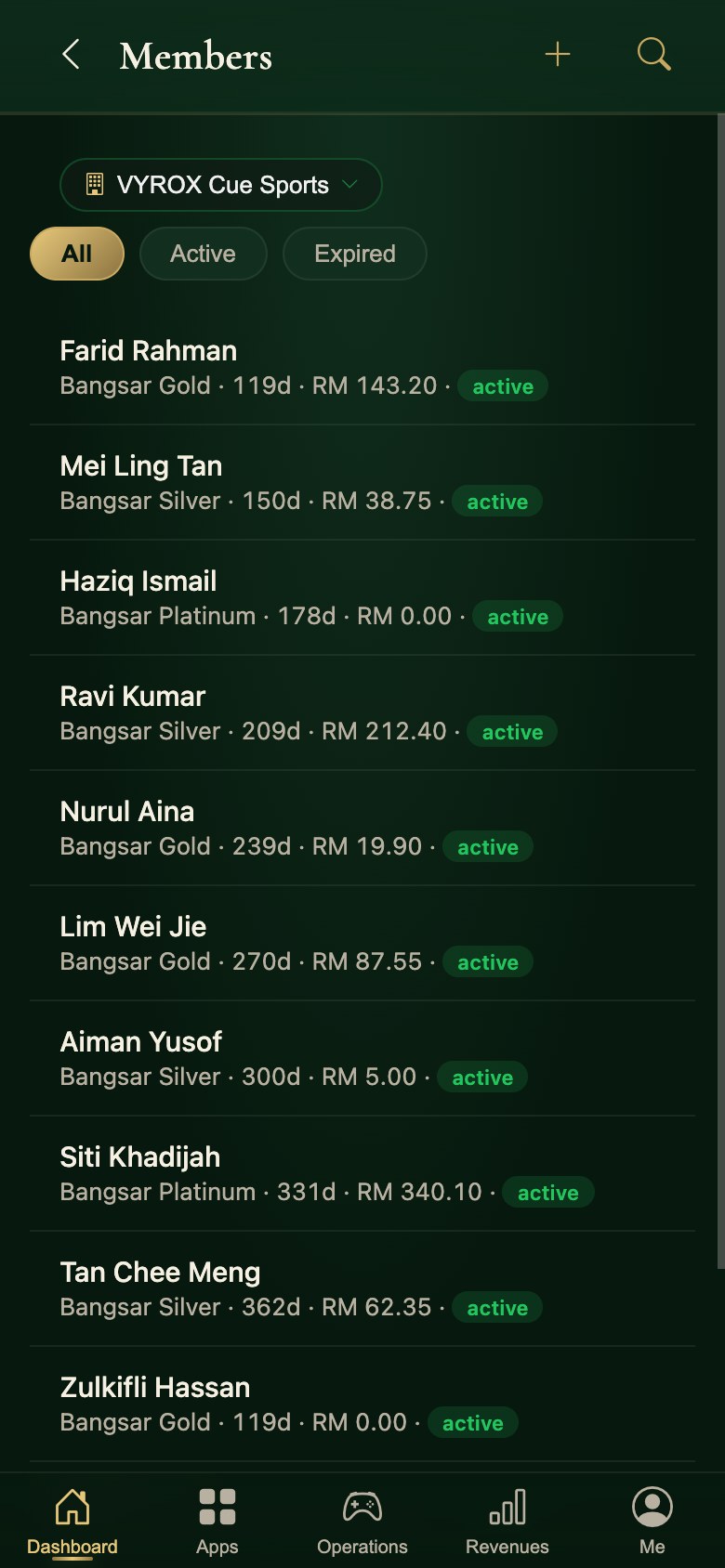
  15. The member directory in the Snooker King operator app: plan, expiry and credit per member

    15Look a member up

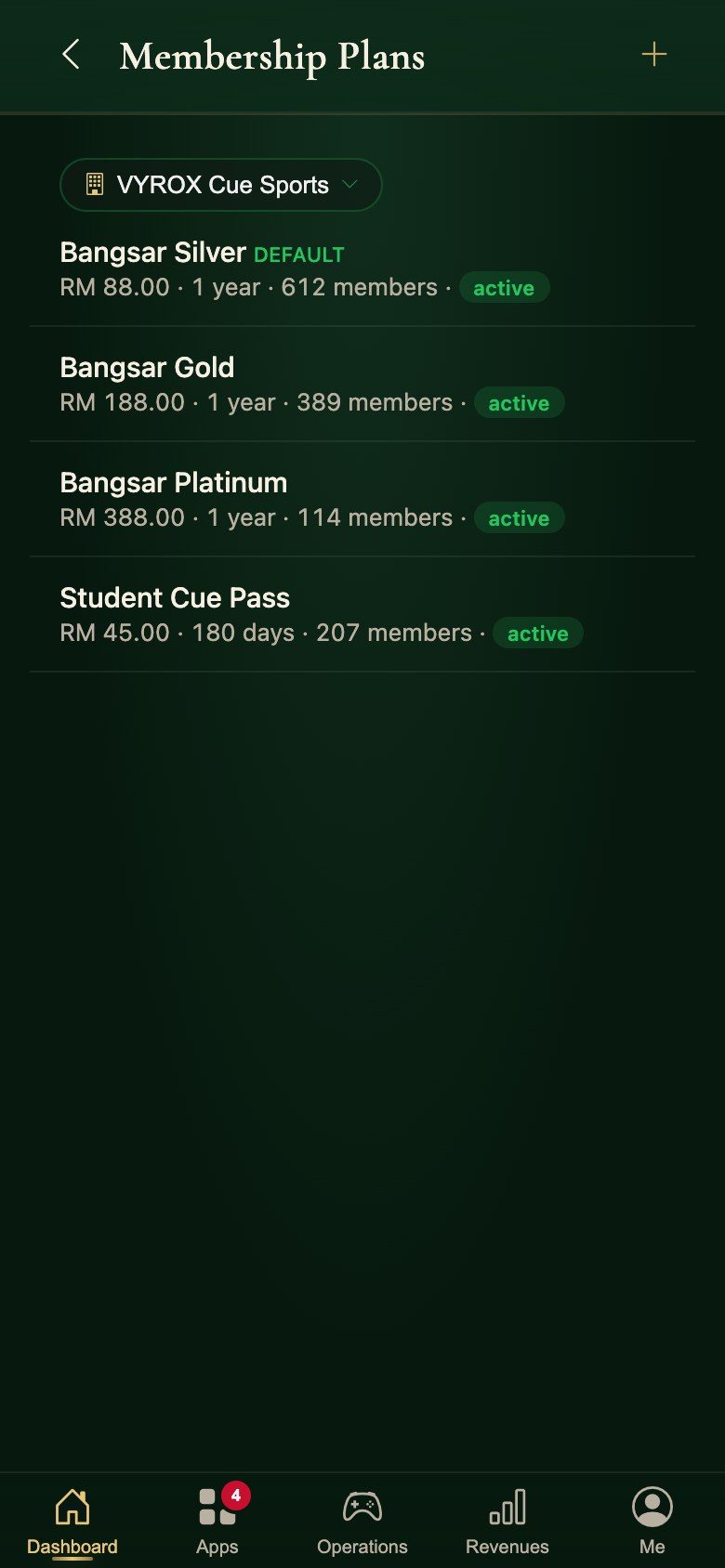
  16. Membership plans in the Snooker King operator app, each with its live member count

    16Manage the plans

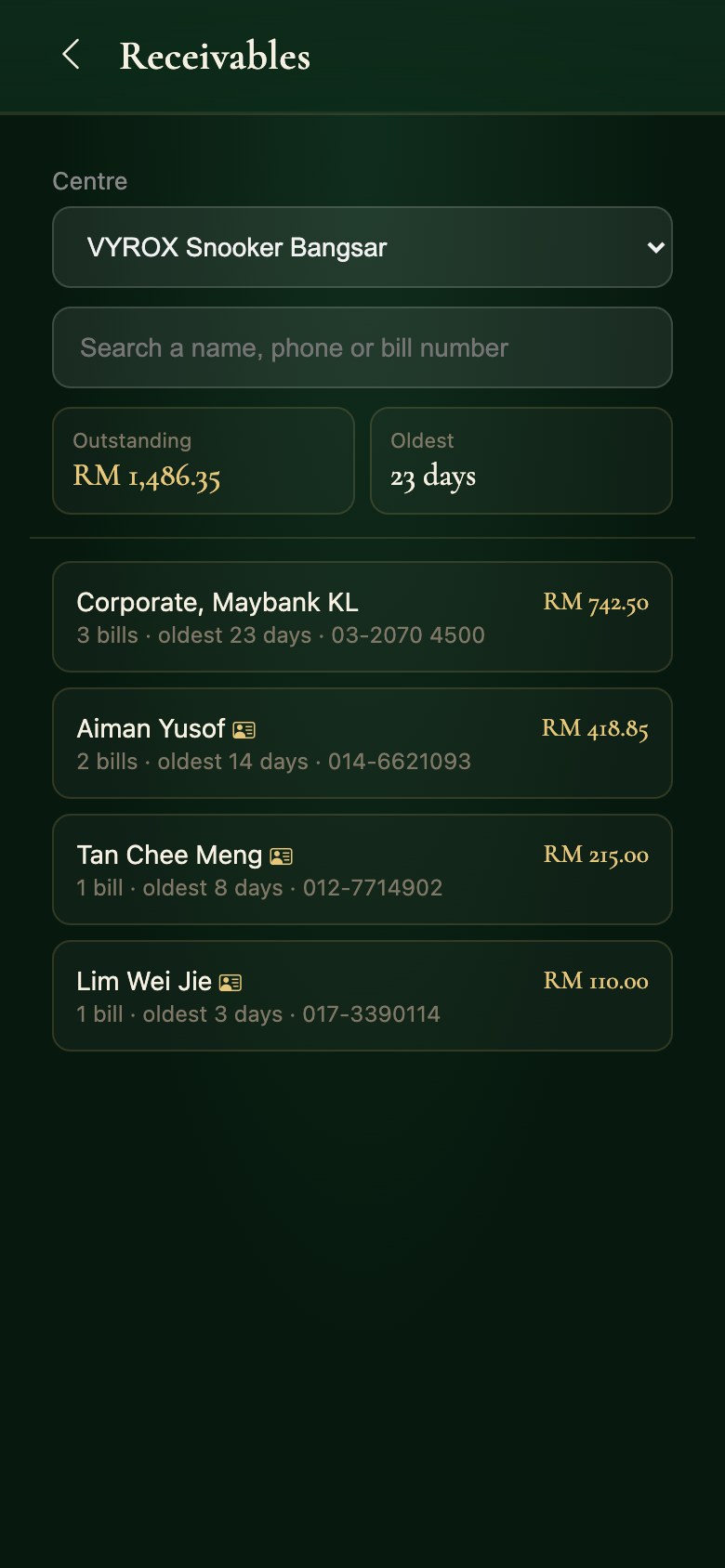
  17. Receivables in the Snooker King operator app: what is outstanding and how long it has waited

    17Chase what is owed

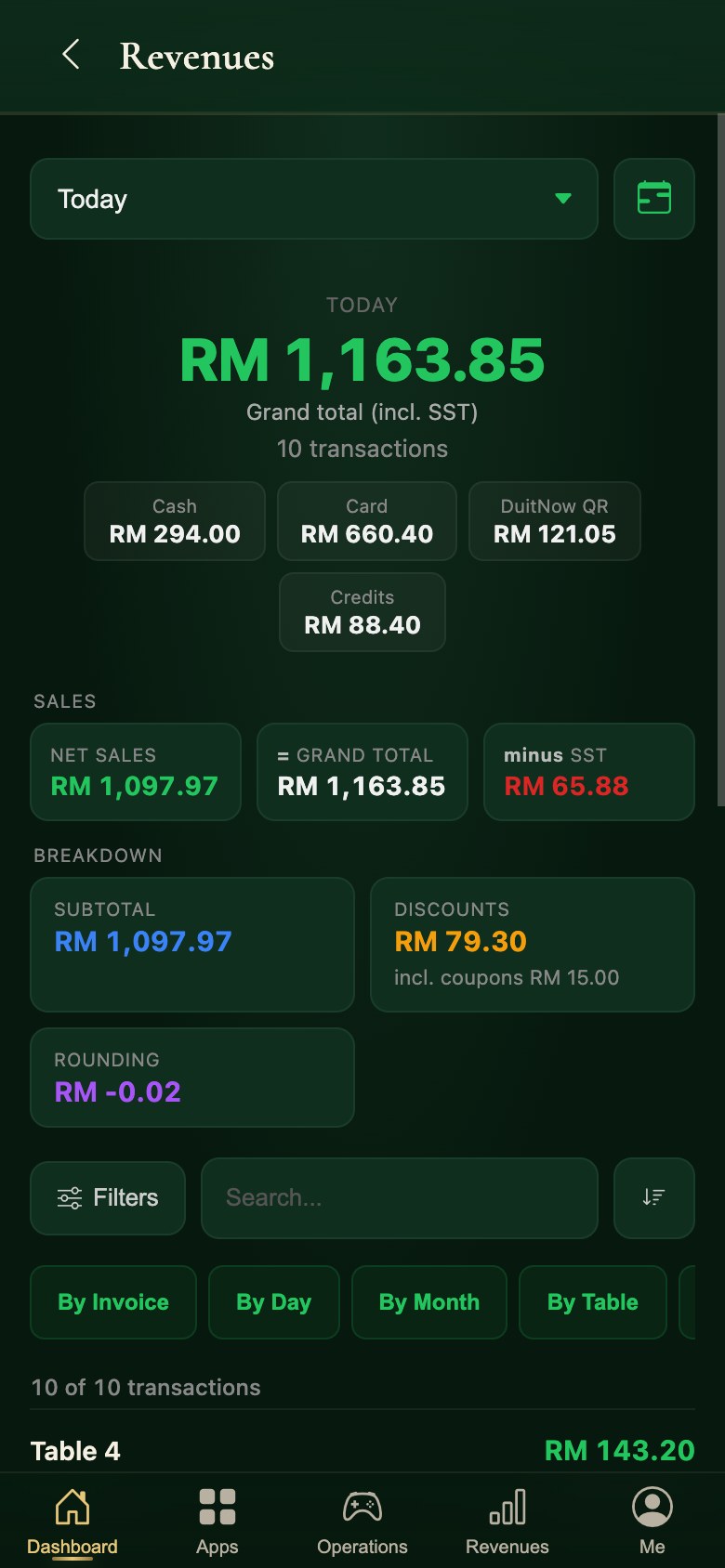
  18. Today’s revenue in the Snooker King operator app, split by payment method with the tax line

    18Today’s takings by method

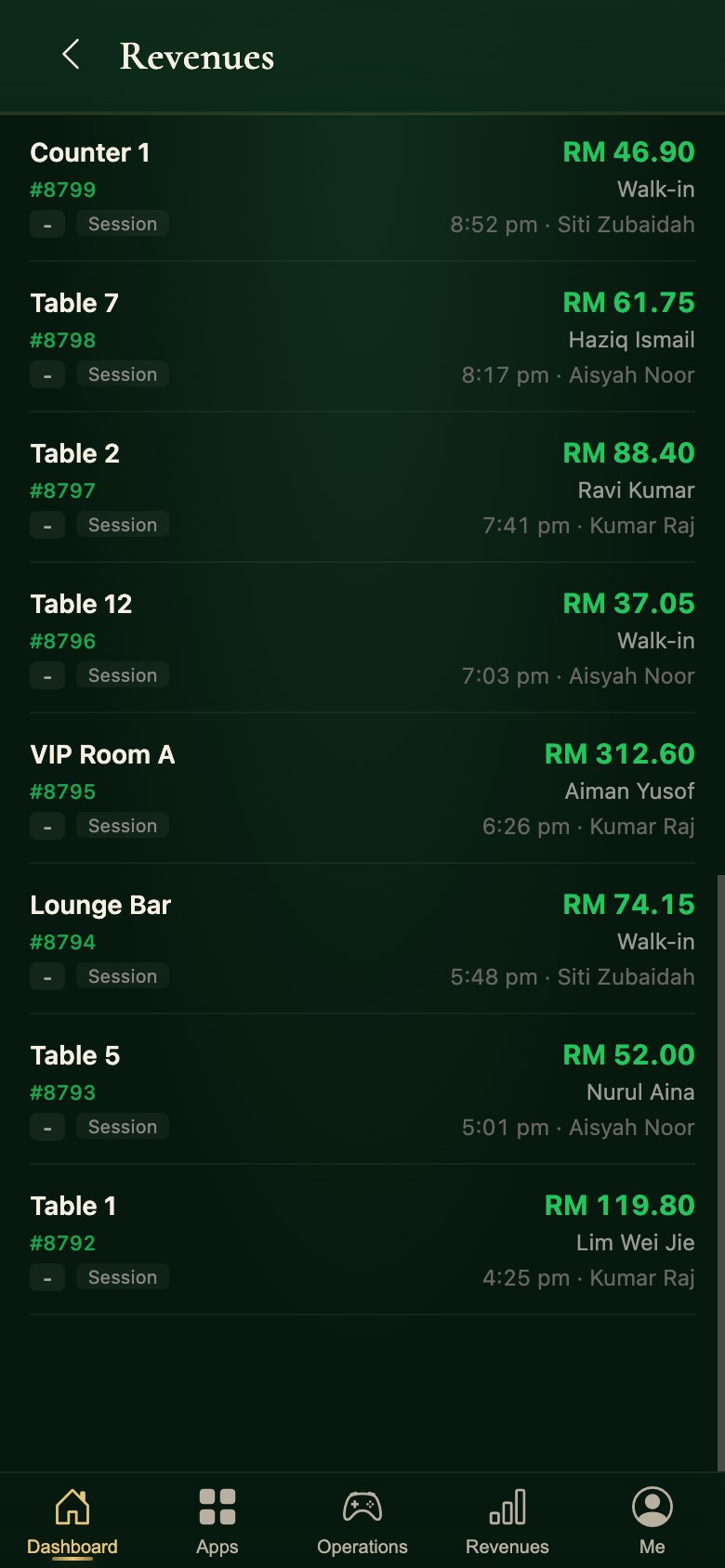
  19. The transaction list in the Snooker King operator app, bill by bill with the server who closed it

    19Every transaction, bill by bill

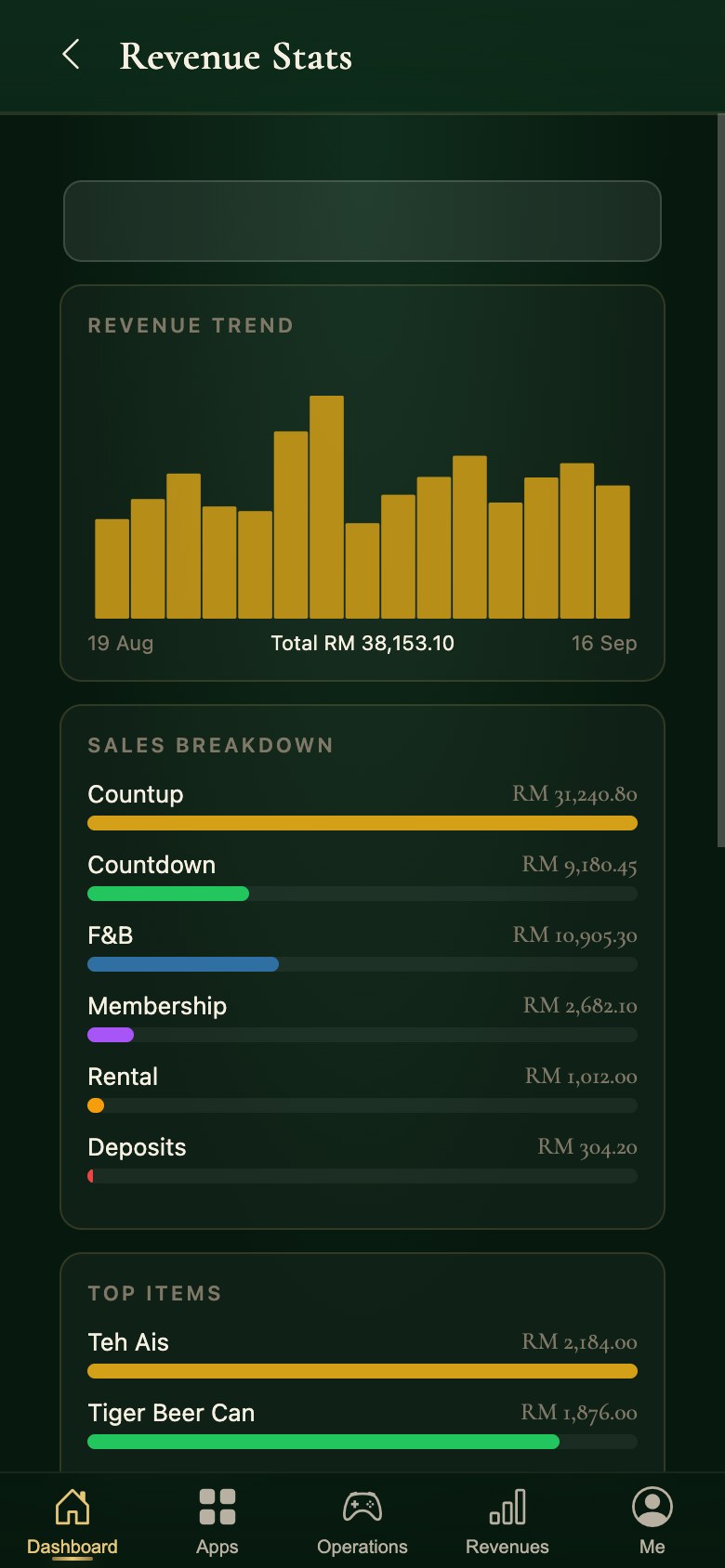
  20. The sales report in the Snooker King operator app: the revenue trend and where it came from

    20Read the month as a chart

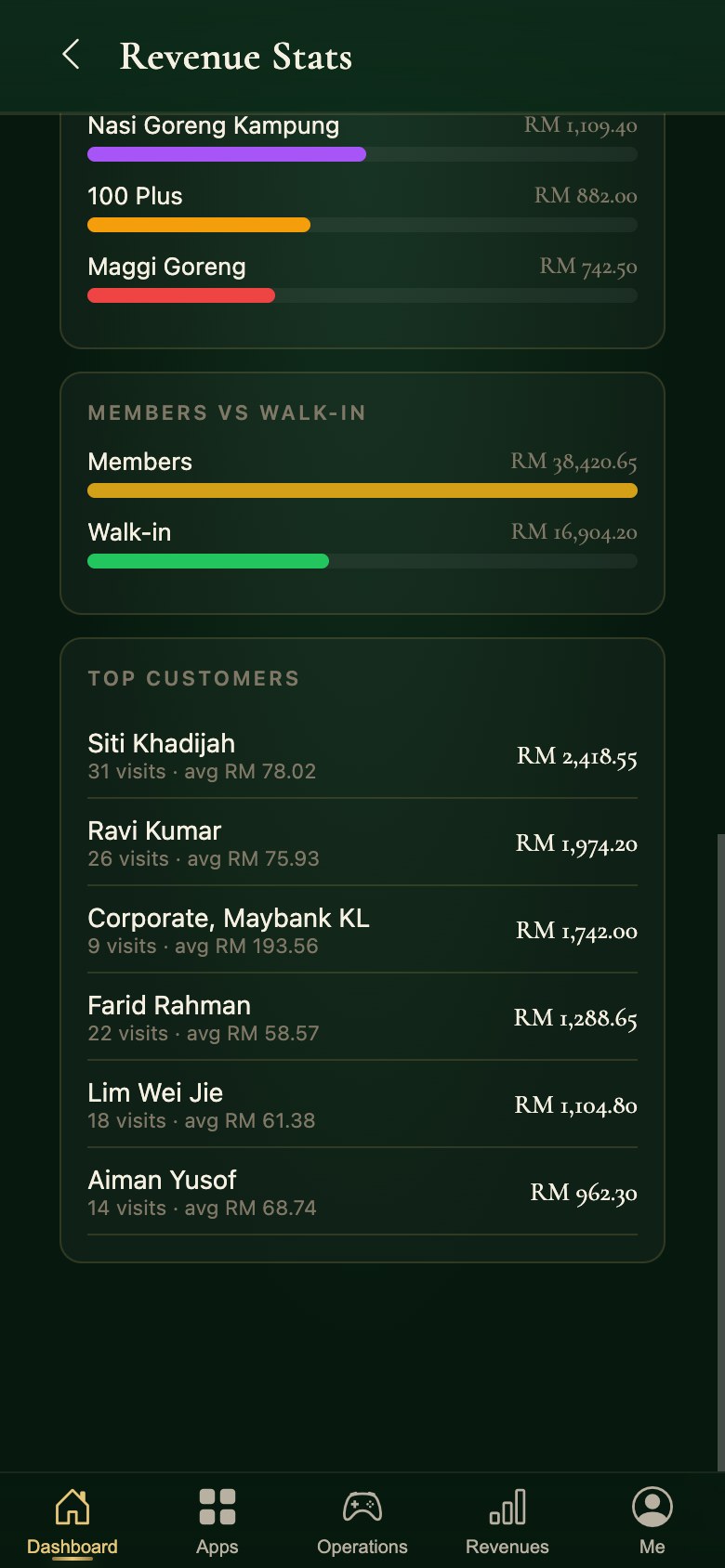
  21. Members against walk-ins, and the top spenders, in the Snooker King operator app

    21See who is actually spending

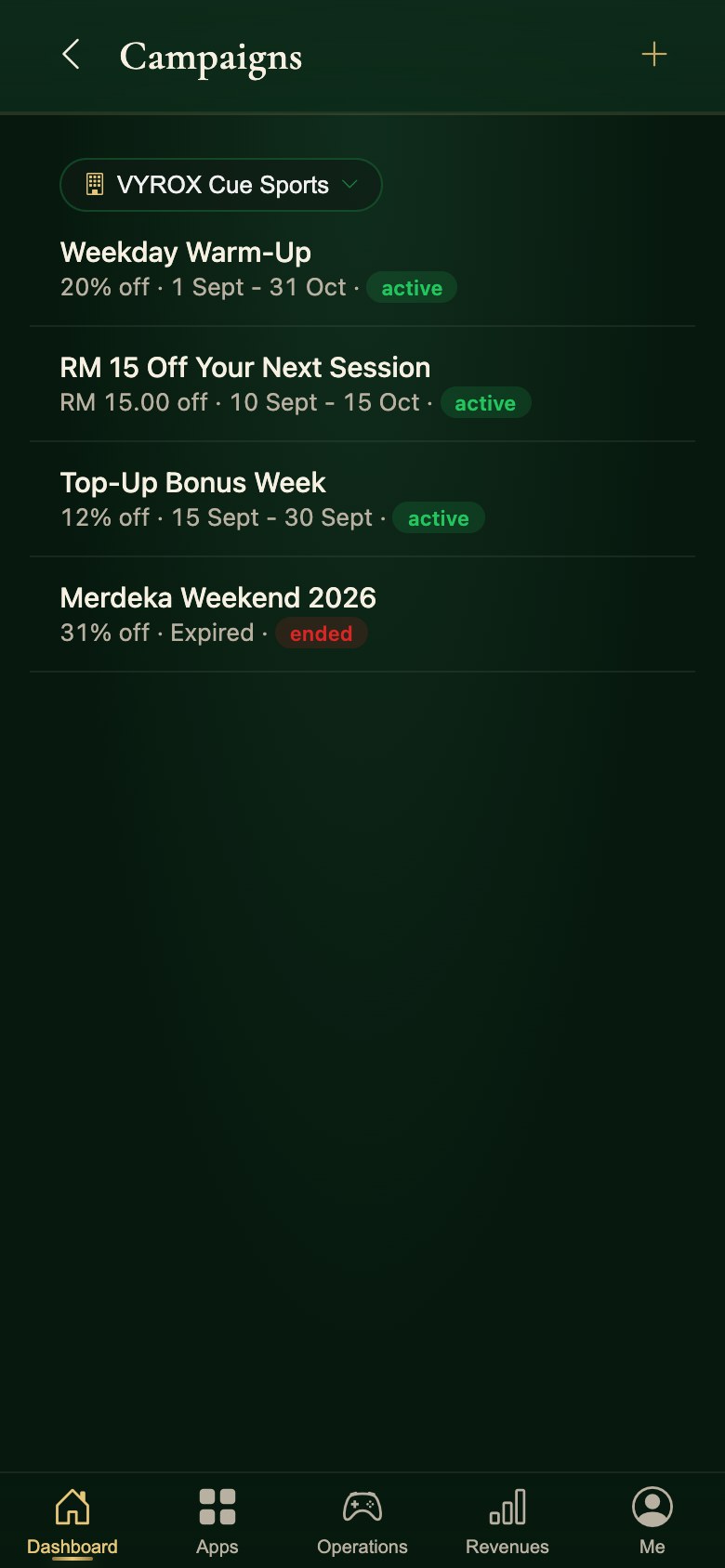
  22. Discount campaigns in the Snooker King operator app, with their window and their state

    22Run a promotion

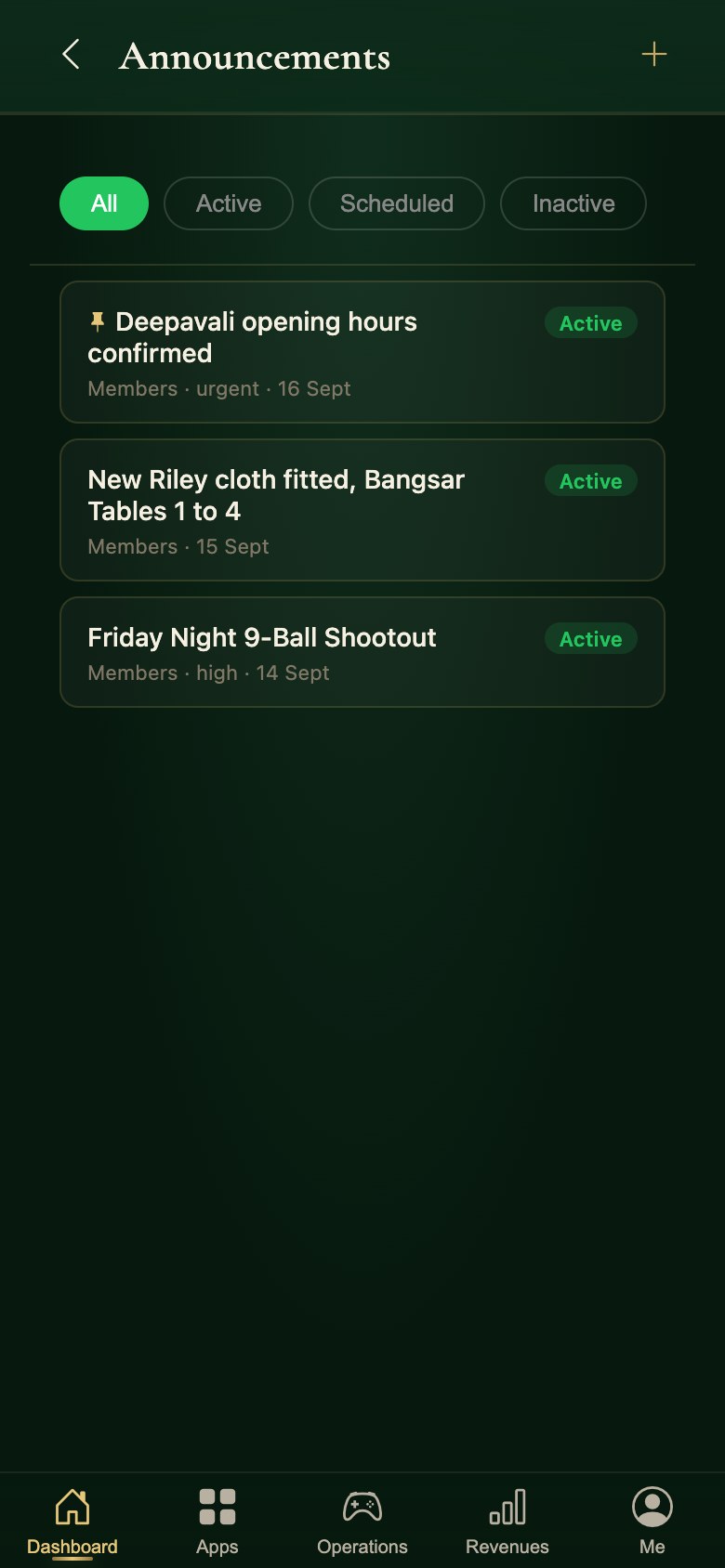
  23. Announcements in the Snooker King operator app, published to the floor and to members

    23Tell the floor and the members

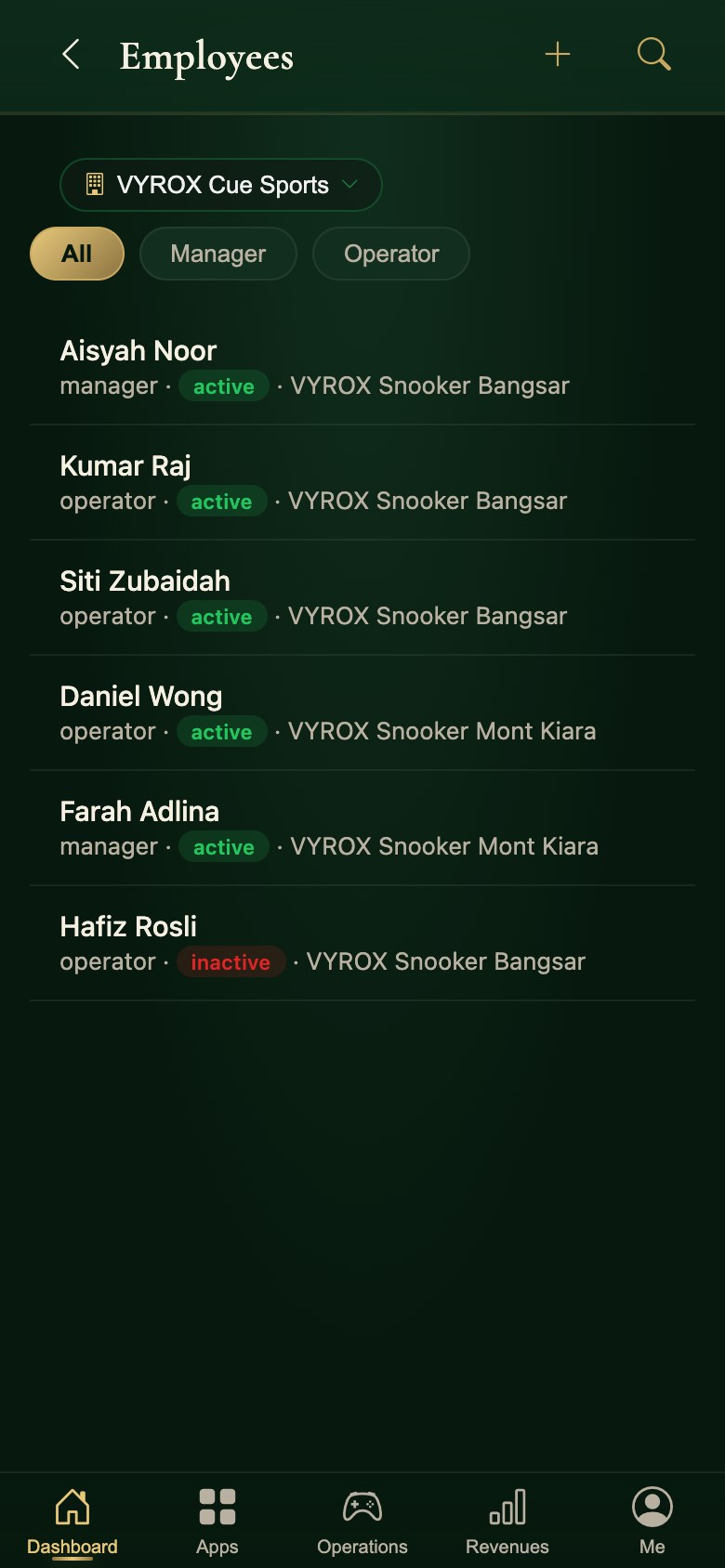
  24. Staff in the Snooker King operator app, by role and by centre

    24Check who is on the roster

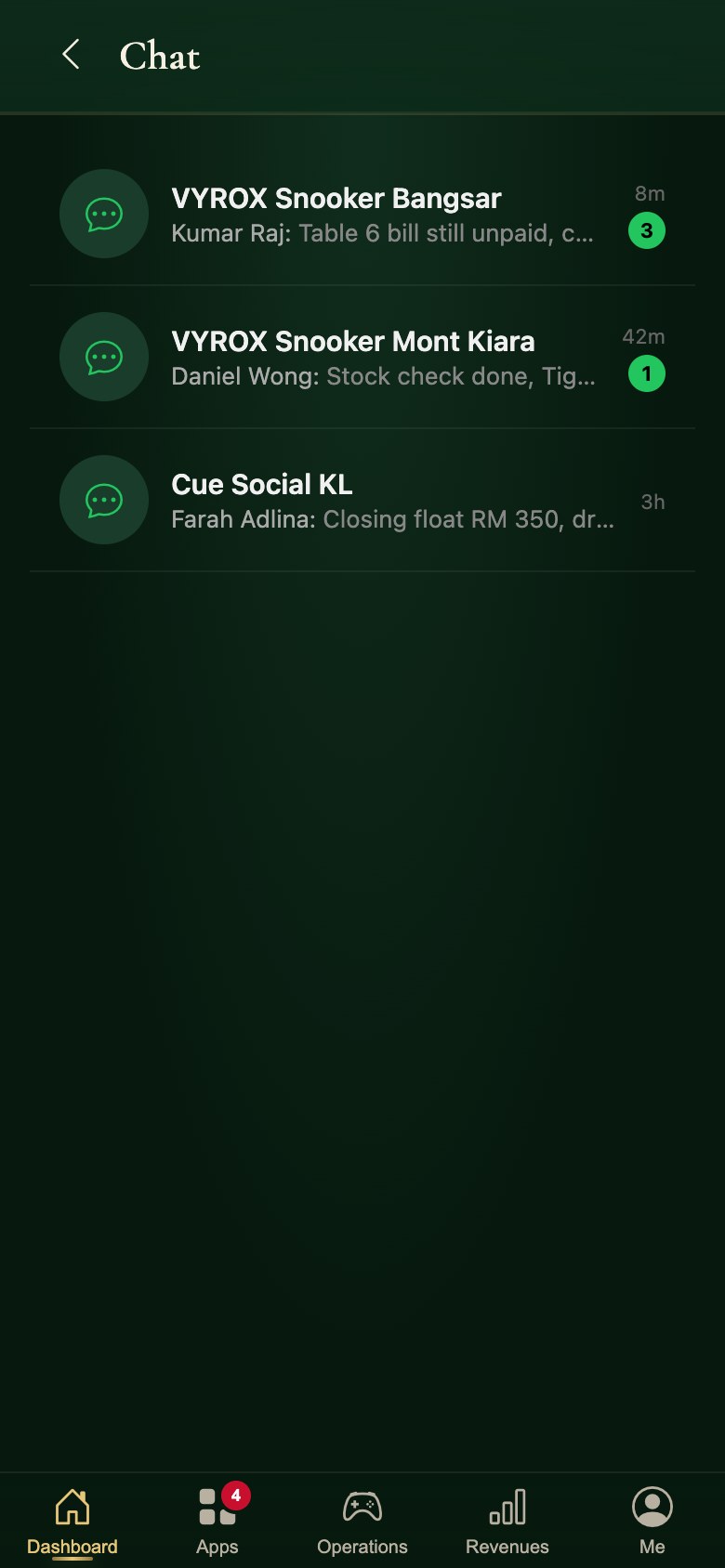
  25. Per-centre staff chat in the Snooker King operator app

    25Talk to the shift

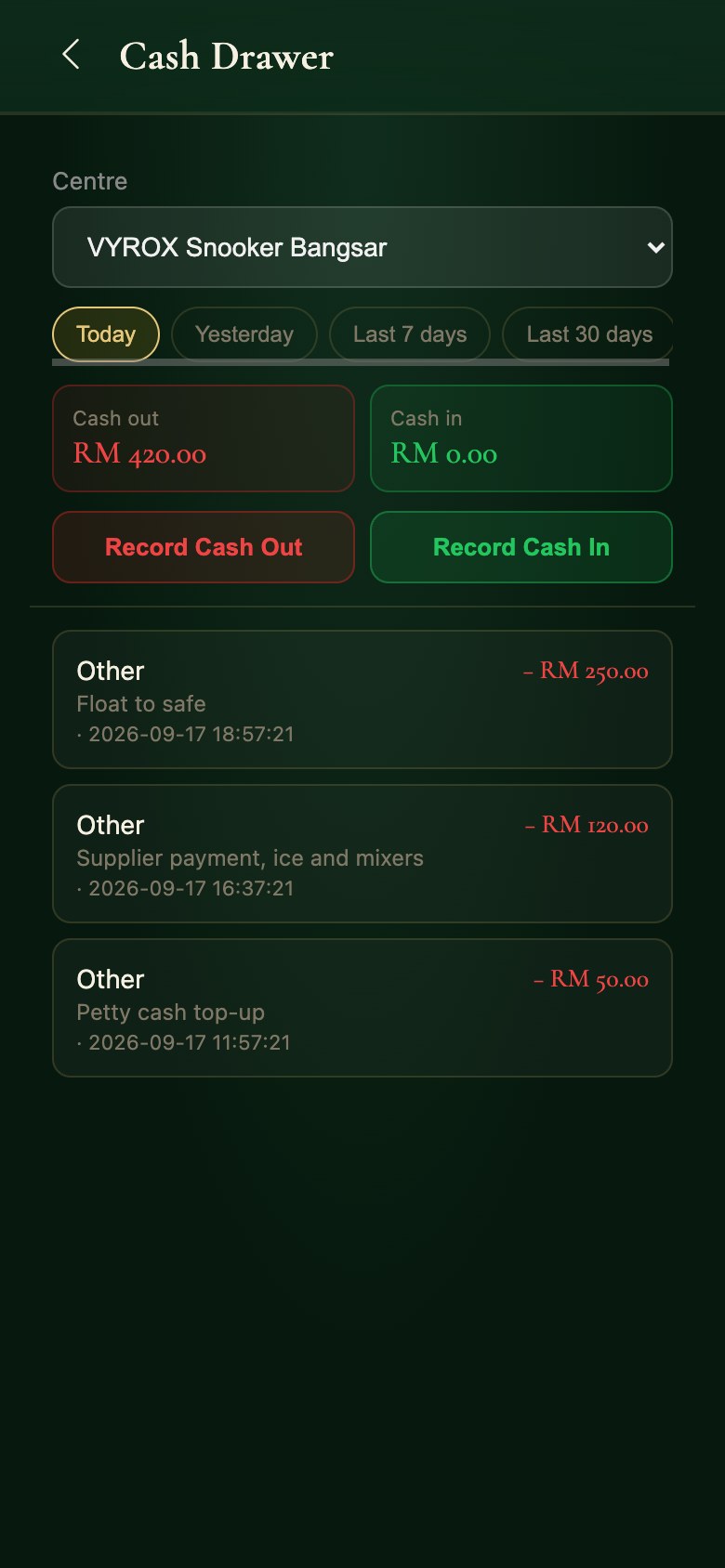
  26. The cash drawer ledger in the Snooker King operator app: every cash-in and cash-out with a reason

    26Log cash in and cash out

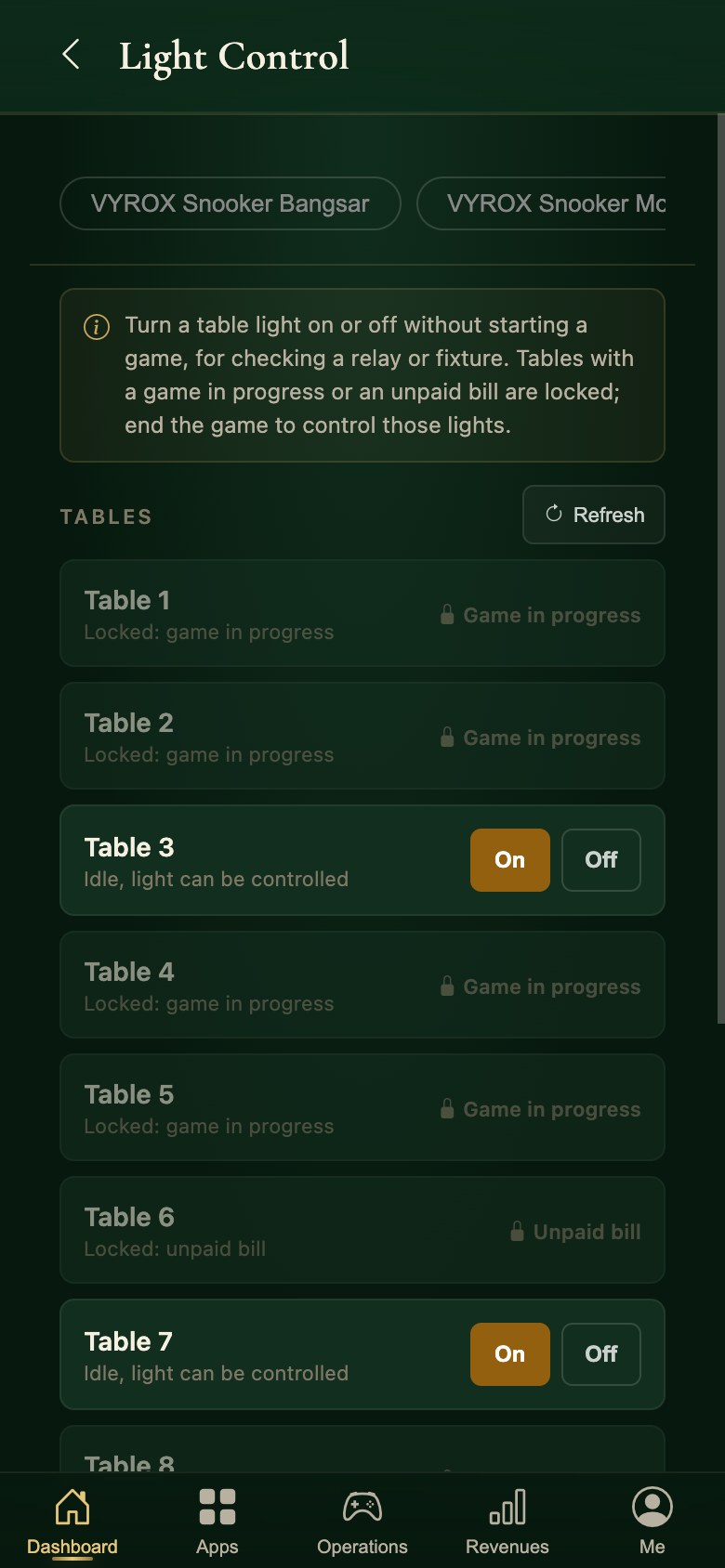
  27. IoT table lights in the Snooker King operator app, with tables locked while a game is running

    27Turn a table’s light on

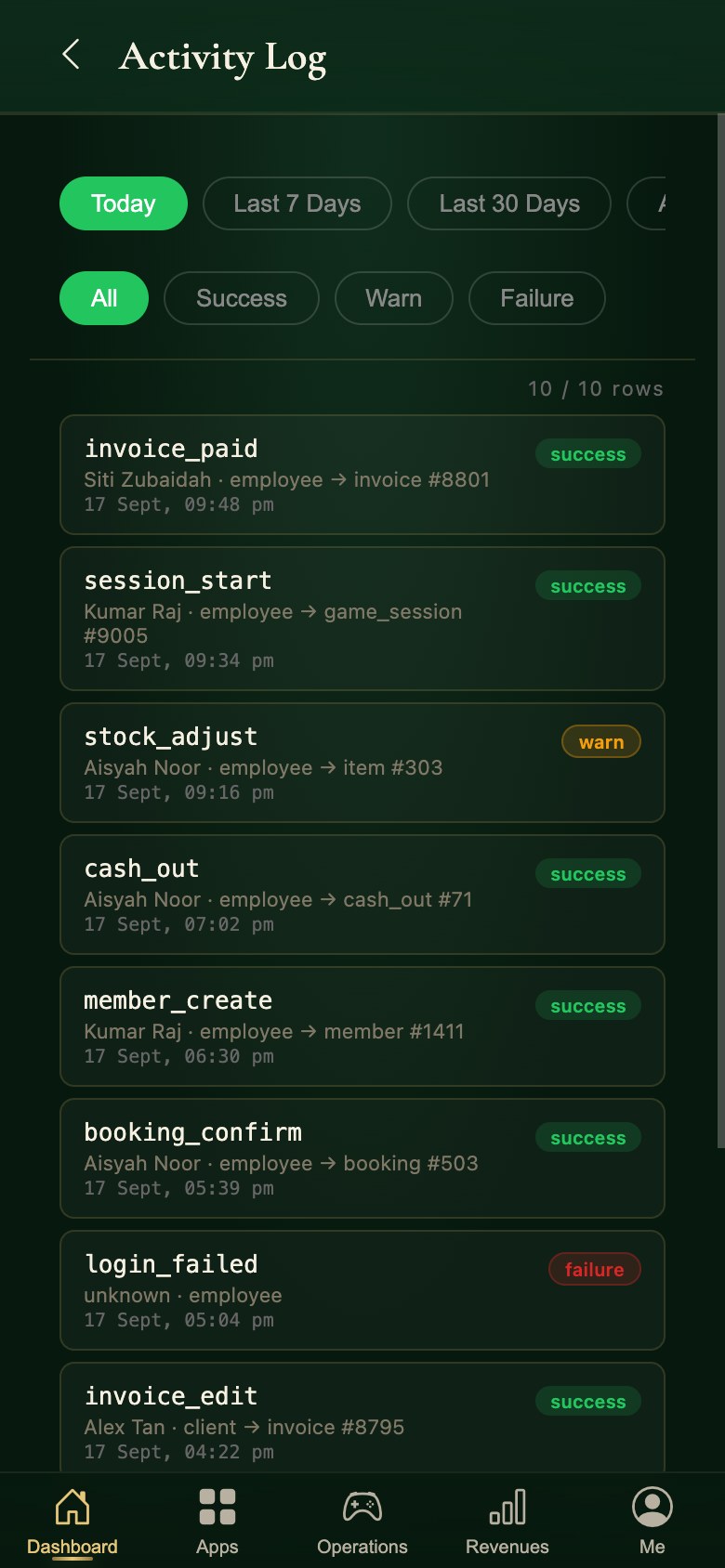
  28. The activity log in the Snooker King operator app: who did what, and whether it succeeded

    28Read every action taken

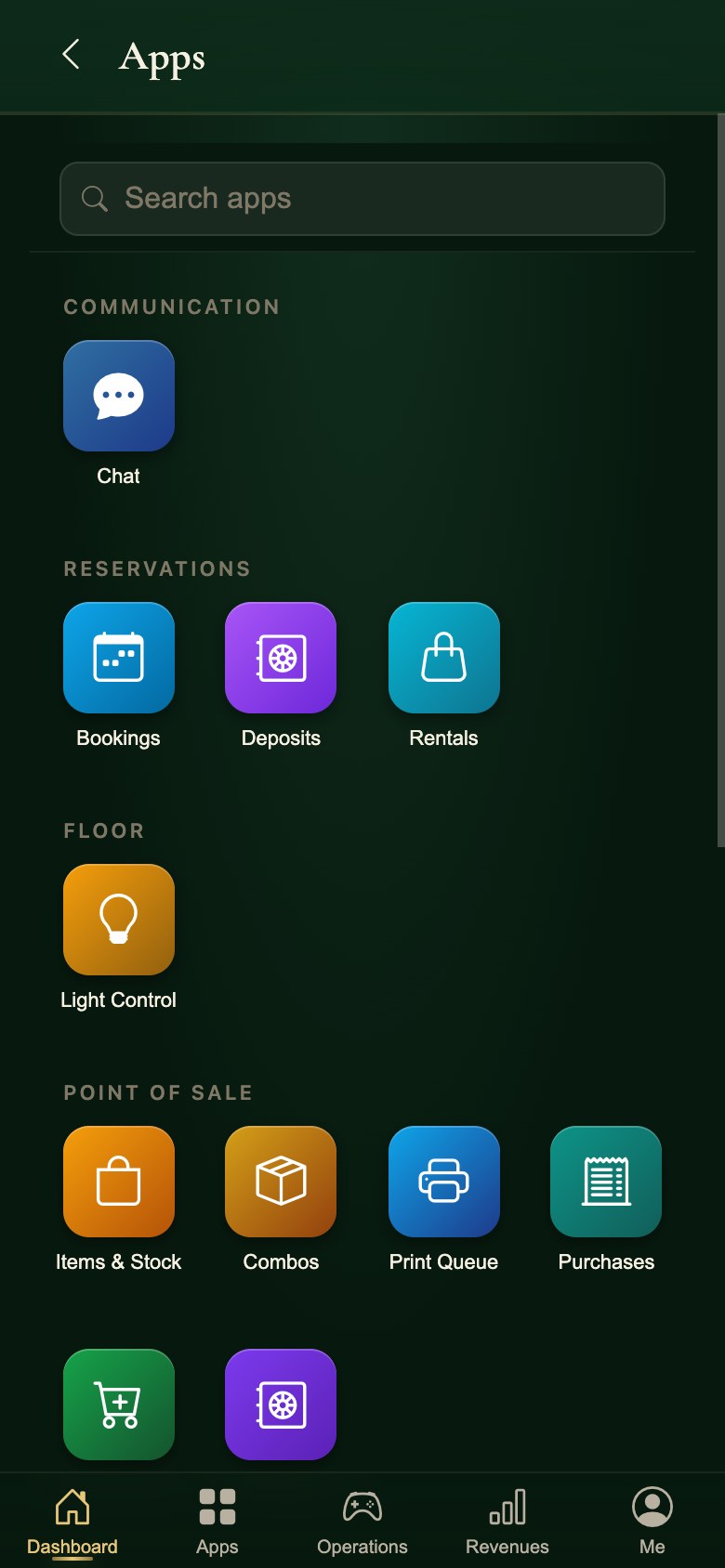
  29. The app launcher in the Snooker King operator app, every tool in one grid

    29Reach every tool from one grid

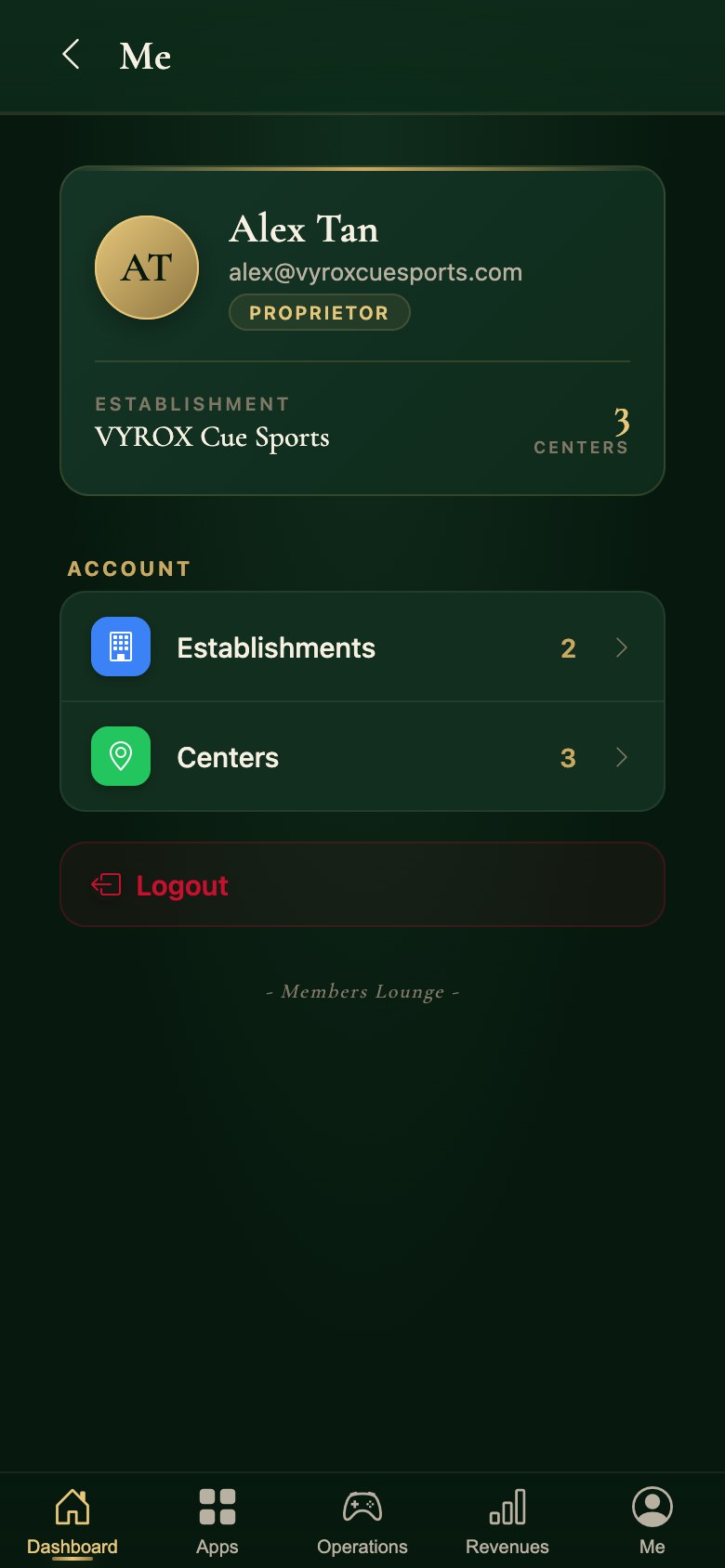
  30. The owner account in the Snooker King operator app, with the establishments and centres it covers

    30Your account and your centres

Tables

Sessions, timers, rates and the till.

70capabilities

The Engine Underneath Every Active Table

Countup, Countdown, Grace, Overtime - One State Machine

Every active table runs through one persistent state machine - countup billing, countdown packages, grace periods, overtime alerts, mid-session role swaps, manual time adjustments. Power loss recovers to the last known state. Multi-rate checkpoints lock the price at the peak/off-peak boundary so the bill is right even when the clock crosses midnight.

Countup Billing

Pay-by-minute with dynamic rates, pause and resume, switch table mid-session.

Countdown Packages

30 min - 10 hr fixed-time packs. Top-up mid-game. Stack two 30-min packs for a clean hour.

Grace Period

Configurable per package. Players finish the rack instead of getting cut off mid-shot.

Overtime Tint

Amber alert on the operations grid the moment a session crosses its package end.

Multi-Rate Checkpoints

Lock the price at the peak/off-peak boundary. The bill is right even when the clock crosses midnight.

Mid-Session Role Swap

Replace the paying member without ending the session. Round-robin timer slices each player's share.

Manual Time Adjust

Add or subtract minutes with a reason code logged. Auditor reads the why, not just the what.

Server-Side Session Clock

State persists on every change. Reboot mid-evening - every active table comes back at the right second.

A POS Built for the Cue Floor

Smart Pricing

Pricing That Knows the Time of Day

The right rate, on the right table, at the right hour - charged automatically with zero counter clicks.

Peak & Off-Peak Rates

Set distinct hourly rates for morning, afternoon, evening and late night. The system flips between them at the exact times you define - your staff never need to lift a finger.

Holiday & Special Day Rates

Bump rates up for public holidays and special occasions ahead of time. The right pricing kicks in on the right dates without anyone remembering to flip a switch.

Per-Table & Per-Type Rates

Charge premium money on VIP tables and friendlier rates on practice ones. Set pricing per individual table or per table type - your best tables finally bring in what they're worth.

Rate Priority Engine

When several rate rules collide, the engine resolves them in a defined order: specific date > holiday > day of week > membership tier > default. The result: the correct rate, every time, with no human in the loop.

Membership Tier Discounts

Silver members get 10% off, Gold members get 20%, applied automatically at checkout with no operator override. Each tier can carry its own discount rate for tables, POS items or both.

Duration Tiers

First hour at RM28, every hour after that at RM18 - or build as many duration tiers as you like. A clean way to reward longer sessions and lift the average spend per visit.

Venues running dynamic pricing report 25-35% more revenue - without buying a single new table. Same tables. Same customers. Just sharper pricing.

Split the Bill, Not the Friendship

Groups share the table, not the tab. Each player only pays for what they used - game time, food, drinks - on their own invoice and with whichever payment method they prefer.

Select Players

Members or Walk-ins

Assign Items

Game Time + F&B

Pay Individually

Separate Invoices

Flexible Splitting

  • Split by player or equal share
  • Assign F&B items to specific players
  • Game time split per player duration

Partial Payments

  • Pay now, settle later for others
  • 7 payment methods per split
  • Member credits and points accepted

Proforma Preview

  • Live running total during game
  • View invoice before checkout
  • Tax, service charge, discount preview

Multi-Rate Checkpoints

  • Each round locks in the rate at that minute, not at checkout
  • A 9pm-to-1am session bills peak and off-peak segments correctly
  • No more "they crossed midnight, what do I charge?" arguments

Slice the Round

  • Add checkpoint mid-game when a player joins or leaves
  • Merge or undo last checkpoint with automatic re-proration
  • Reopen ended split-bill (admin override with audit)

Group Checkout

  • Consolidate N individual invoices into one master receipt
  • Mix cash, card, e-wallet, credit, points across one party
  • Live cash-tender chips with auto change calculation

Idempotent Splits

  • Lost connection mid-split? Resend safely - never duplicates
  • Each payer's invoice is retry-proof - no duplicate charges
  • Atomic locks on credit deduction across concurrent terminals

Ticketing Mode

From Walk-In to Game On in Seconds

The fastest way to start a session. Scan a QR code or swipe an RFID card and the table activates instantly - no clicks, no delays.

Scan QR / Swipe RFID

Camera or Card Reader

Instant Activation

No Manual Steps

Light ON + Timer Starts

IoT Integrated

QR Ticketing

  • QR code scan to start countup or countdown
  • Camera mirror toggle
  • Built-in dashboard QR scanner

RFID Ticketing

  • RFID card swipe to start session
  • Bind RFID cards to specific tables
  • Ticketing mode toggle per center

Time Billing Mode

  • Card tap triggers time tracking
  • Integrated with lighting (auto ON)
  • Member rates auto-applied on scan

Setup Wizard

  • Step-by-step new center onboarding
  • 7 user types (system admin · client · organisation · manager · operator · employee · member)
  • Reconciliation tools for admin-level audit

Forensic Session Replay

When a Member Disputes the Bill, You Have Receipts

Every state change on every table - session start, member swap, timer adjust, payment apply, void - gets a full snapshot in the table-history ledger. Replay any session, any day, down to the second. Disputes resolve with a printed timeline, not a shouting match.

Immutable Event Log

Append-only. Nothing gets edited or deleted - only new rows are added.

Full State Snapshots

Members, items, timers, revenue at that exact moment - all captured per event.

Search by Member / Date / Table

"Show me Table 7 last Saturday between 9pm and 11pm" - three clicks.

Member Swap Trace

"Alice played 19:00-19:45, Bob 19:45-20:30" - both timeline rows visible side by side.

Reason Codes Inline

"+15 min, reason: cue tip changed". The why is on every adjustment.

CSV / PDF Export

Hand the auditor a clean export. Hand the member a printed dispute brief.

Cross-Reference to Invoices

Each event row links straight to the invoice that came out of it - single source of truth.

Void / Refund Trail

Voids never erase the original - they append a reversal row with reason and approver.

Six full-size snooker tables in a row down a hall, each under its own pendant lamp

Kitchen

A real kitchen operation attached to the table, with stock behind it.

48capabilities

A Real F&B Operation, Built In

From menu setup to kitchen tickets to customer self-ordering by QR code. Run your F&B floor side-by-side with the gaming floor without breaking a sweat.

Customer Scans QR

Opens Ordering App

Browse & Order

Self-Service Menu

Kitchen Receives

Auto-Print Ticket

Menu Management

  • Unlimited food & drink categories
  • Items with photos & barcodes
  • Options / preferences / add-ons
  • Live price calculation with addon totals
  • Drag-drop F&B floor layout designer
  • Combo bundles with sub-item breakdown
  • Orders auto-append to active table bill

4-Panel Ordering

  • Categories panel with icons
  • Items panel with search & photos
  • Active orders panel
  • Payment & checkout panel

Kitchen & Operations

  • Thermal kitchen ticket printing
  • Reprint detection & bold warnings
  • Customer QR ordering app (mobile-first)
  • Multi-order session support per table
  • Up to 4 separate spending groups on one table, each with its own running tab and its own kitchen cancellation slip

Per-Category Printer Routing

  • Drinks to bar printer, hot food to kitchen, snacks to counter
  • Default printer set per category, with per-table override
  • Partial-print mode - print only specific items from one order

Order Lifecycle Status

  • Draft → Submitted → Cooked → Served → Cancelled
  • Floor staff see what's cooking right now
  • Reprint kitchen ticket by order ID with reprint counter

Print Queue Persistence

  • Job queue survives a browser reload - nothing is "lost"
  • Status per job: pending · printing · printed · failed
  • Auto-retry on failed jobs without manual re-tap

Inventory Tied to Sale

  • Stock-before and stock-after recorded on every movement
  • Combo items reserve stock across all sub-items at once
  • Audit-repair-stock script catches drift and fixes it

Supplier Directory

Keep every supplier in one place - quick-add and search by name with phone, email and address on file. No more digging through chat threads to find who you buy your cues, chalk and drinks from.

Purchase Invoices That Receive Stock

Record purchase invoices with full line items, discount, tax and service-charge math and a clean totals rollup. Each line posts a goods-receive stock movement straight into inventory, so what you bought and what is on the shelf always agree.

Per-Supplier Cost Tracking

Every purchase feeds per-supplier cost trends, so you can see who is creeping up on price and negotiate from a position of strength. Your margins stop leaking to the suppliers you never checked.

A QR Sticker, A Phone, an Order

Customers scan a QR code on the table, flip through your menu on their own phone and order food and drinks - no app install required. Orders fly straight to the kitchen.

Scan QR Code

Phone Camera

Browse Menu

Add to Cart

Order to Kitchen

Auto-Print Ticket

Dynamic Menu

  • Images, prices, descriptions
  • Category-based browsing
  • Hide sold-out items

Multi-Order

  • Order multiple times per session
  • Cart with quantity selection
  • Auto-add to table session bill

Kitchen Tickets

  • Auto-print to kitchen printer
  • Table number on ticket
  • Order time and items listed

Smart QR System

  • Dynamic vs static QR modes
  • Center branding on app
  • No app download required

OTP Order Verification

Links anonymous QR orders to a phone number - no anonymous chargebacks.

5 Order-Item Statuses

Draft, submitted, cooked, served, cancelled - full kitchen lifecycle.

Per-Category Routing

Kitchen vs bar vs counter - each category prints to the right station.

Reprint Counter

Reprint kitchen ticket with a counter (audit how many times).

Abandoned-Cart Sweep

Cleanup runs automatically - kitchen never sees ghost orders.

Streamed Menu Images

Keep the customer's data plan tiny - only what's on screen loads.

Inventory and Stock Without the Spreadsheets

Track every item from goods-in to the moment it sells. Stock deducts automatically when POS items go through, with a full movement history and audit reports to back it up.

Stock In

Receive & Record

Track Movements

Auto-Deduct on Sale

Audit & Report

Opening, Sold, Closing

Stock Tracking

  • Real-time quantity tracking
  • Categories and subcategories
  • POS item auto-link

Movement Logs

  • In/out/adjustment records
  • Reason codes for adjustments
  • Revenue-linked sold tracking

Audit & Repair

  • Stock audit reconciliation
  • Repair stock handling
  • Damaged goods tracking

Alerts & Reports

  • Low stock threshold alerts
  • Opening/closing stock reports
  • Multi-center isolation

Adjustment Audit

  • Mandatory reason on every adjustment
  • Stock-before and stock-after on every movement
  • Audit-and-repair tool detects and fixes drift

Auto-Alerts & Imports

  • Low-stock alerts emailed to the manager automatically
  • CSV import for opening stock or supplier deliveries
  • Movement log filterable by item, category, user, date

Auto-Deduct Streams

  • Auto-deduct on F&B + game-attached items
  • Auto-restore when items removed from cart

Service Lines

  • N/A items for service-only lines (no stock)
  • Per-center inventory isolation
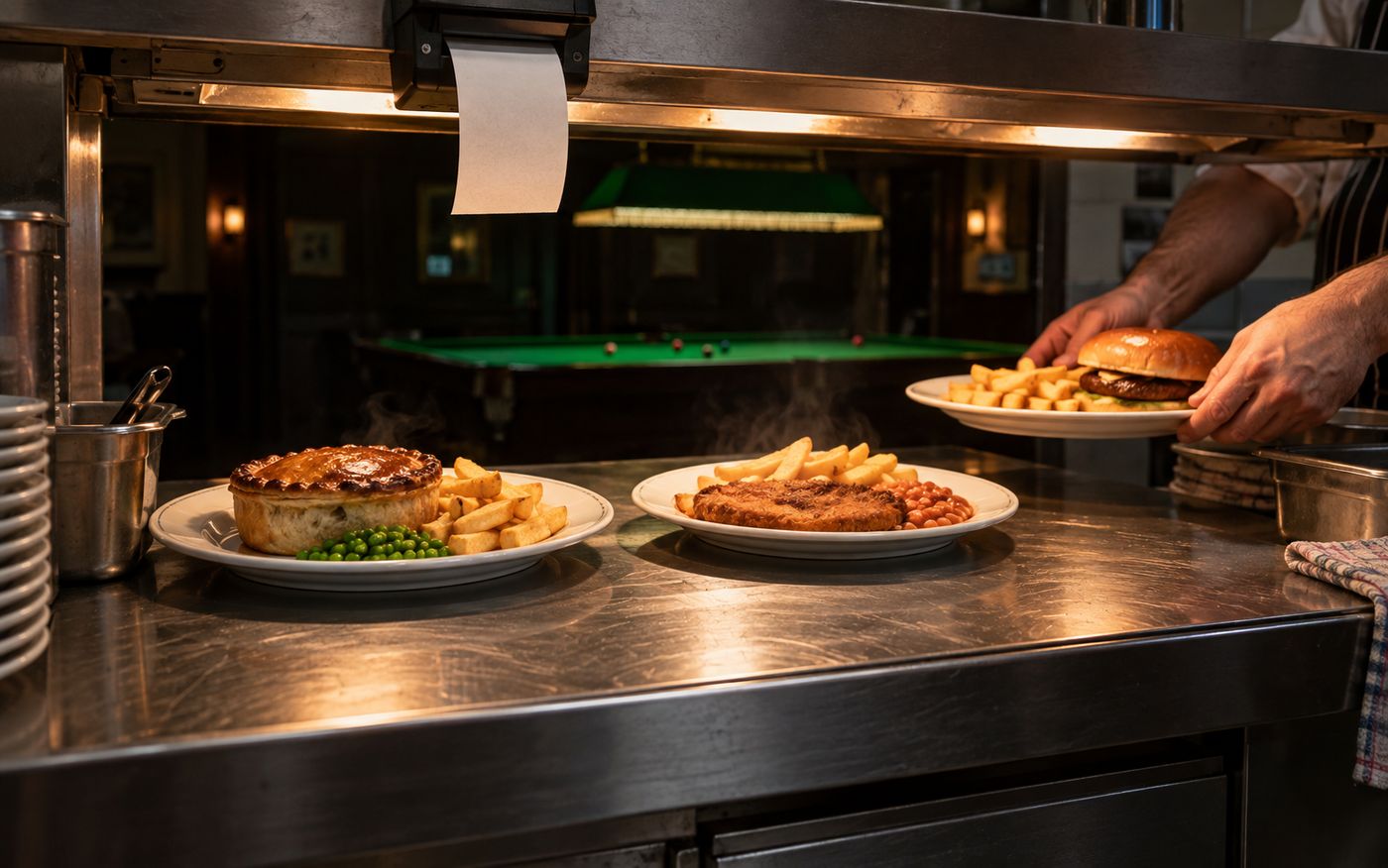
Plates leaving the pass of a snooker club kitchen with the order ticket printing above them

Bookings

Fill tomorrow before it arrives, and rent what is not a table.

47capabilities

Advance Table Booking System

Let customers lock in tables ahead of time. Visual calendar, automatic proforma pricing, check-in workflow and no-show tracking are all baked in.

Book a Table

Calendar Selection

Customer Arrives

Check In

Game Starts

Session Active

Visual Calendar

  • Interactive time-slot grid (tables x time)
  • Color-coded: available, booked, unavailable
  • Click-to-select time range

Smart Scheduling

  • Per-table-type settings and durations
  • Day-specific availability rules
  • Min/max advance booking window
  • Group or multi-table booking per session

Check-In & Status

  • Booking badge on table cards
  • One-click check-in with proforma
  • Status flow: confirmed, checked-in, completed
  • Deposit requirement per booking type
  • Booking confirmation details at a glance

No-Show Tracking

  • Auto-expire stale bookings
  • No-show history per member
  • Proforma calculation with member discounts

Visual Branding

  • Calendar swatch picker - 8 colours to brand your view
  • Yellow upcoming-booking badge with countdown to start

Soft-Lock & Selection

  • Booking soft-lock - staff can't start the table until check-in or no-show is recorded
  • No-show tracker per member (so VIPs don't lose their slot to a flake)
  • Drag-select on the calendar to create a multi-table block

Day-Type Availability Rules

  • Different rules for default · weekday · weekend · specific weekday
  • Available windows + unavailable windows in one day (e.g., 09:00-22:00 open, 12:00-13:00 lunch closed)
  • Cross-midnight windows (open 09:00 to 01:00 next day)

Slot Granularity & Limits

  • Slot duration per table type - 15, 30, 60-minute blocks
  • Min advance (e.g., 1 hour) and max advance (e.g., 30 days) per type
  • Min and max booking duration caps

Business-Day Cutoff

  • Per-center cutoff hour (e.g., 02:00) - late-night sessions count to the right day
  • Reports, shift reports, and bookings all respect the cutoff
  • Timezone-aware - 27+ timezones supported per center

Group & Rental Bookings

  • Single booking can cover multiple tables for one party
  • Booking links to a rental plan - auto-creates rental session at check-in
  • Deposit gating - booking won't activate until deposit is paid

Property Management

Rentals & Property in One Place

A complete rental engine for lockers, rooms, private units and parking spaces. Full deposit tracking, automatic late fees, and a booking calendar with 4 visual floor-plan themes baked in.

Assign Rental

Locker / Room / Unit / Parking

Collect Deposit

Combined Official Receipt

Auto Reminders

Expiry & Late Fee Alerts

Rental Categories

  • Locker, room, unit, parking
  • Category-enforced rent flow (won't mix locker into a room booking)
  • 4 SVG floor plan themes (locker, room, unit, parking)
  • Per-plan duration in years, months, days, or hours

Deposits & Fees

  • 6 deposit types (rental, security, utility, key, renovation, other with custom label)
  • Three late-fee modes: flat amount, percentage, or per-day
  • Auto-generated unpaid late-fee invoice on checkout open
  • Full and partial deposit refunds, with refund receipt
  • Forfeit-deposit workflow to offset damages without moving cash
  • Rental extension and per-period top-up
  • End-session gating (won't end with unpaid late fees or POS items)

Booking Calendar

  • Visual floor plan integration
  • Auto-expiry reminders with live tick
  • Rental invoice and proforma

Official Receipt

  • One-click combined OR (fee + deposits)
  • OR auto-numbering per center
  • Combined OR links multiple revenue items

Deposit Categories

  • 6 categories per plan (rental · security · utility · key · renovation · other)
  • Forfeit deposit with mandatory reason and audit

3 Late-Fee Modes

  • Flat amount, percentage of plan, or per-day
  • Combined Official Receipt across multiple sessions in one print

Direct Charging

  • F&B charged direct to the room (auto-stocked)
  • Auto-extend the booking when the rental extends

POS Allocation

  • Per-line POS allocation across rental + items

Holiday Calendar & Per-Center Rate Profiles

Hari Raya Closes Bukit Bintang But Doubles JB - One Calendar Handles Both

Per-center holiday calendars drive game rates, opening hours, F&B prices, and even tax rules. Mark a date once - every downstream module obeys. Bulk-import national holidays, override per branch, schedule annual recurring closures.

Snooker hall decorated for Hari Raya, festive lamps above tables lit for play

Per-Center Calendar

KL closes for Wesak, Penang stays open - one country, two policies, one calendar.

Drives Rates & Hours

Holiday rates, holiday hours, holiday F&B prices - every module reads from the same source.

Bulk Import Holidays

Pre-loaded national holiday packs for MY/SG/TH/ID/VN/PH - one click loads the year.

Annual Recurrence

Mark "every CNY", "every Christmas Eve" - the calendar rebuilds itself each year.

Override Per Branch

Flagship runs special-rate Hari Raya nights; suburban branch closes - both at once.

Auto SMS Reminders

Members on tomorrow's bookings get a "We're closed" or "Special hours" SMS automatically.

Forfeit-Deposit Tagging

No-show on a holiday with double-rate? Deposit forfeit defaults to "yes" - staff override-able.

Live Table Banner

Lounge TVs auto-show "Closed for Wesak" the day before - no ad-hoc PowerPoint.

A table being booked from a phone while the hall fills up behind

Staff

The people on the floor: their console, their shift, their commission.

43capabilities

Run The Floor From Your Own Phone

A second, staff-only mobile command deck at snookerking.com/app/client-portal/ - owners, managers and employees carry Operations, Revenues, POS, Bookings and Staff on their own phone, role-gated, with no app-store install

Dashboard & Apps Launcher

  • Live sales, sessions and floor status at a glance
  • One tap into every module - no hunting through menus

Operations & Live Table View

  • Start, check and settle games from the phone
  • Light Control - toggle table lights on the go

POS, Counter Sale & Print Queue

  • Ring up counter sales, combos and F&B orders on the move
  • Watch kitchen ticket status without walking to the printer

Bookings, Deposits & Rentals

  • Confirm reservations and manage no-shows from anywhere
  • Track locker, room and parking rentals on the phone

Members, Tiers & Stamp Card

  • Look up a member and issue stamps or credits on the spot
  • Send announcements and run campaigns from the phone

Revenues & Invoice Lookup

  • Check a branch's takings before you even open the laptop
  • Pull up any invoice detail to settle a dispute on the spot

The House - Multi-Center & Staff

  • Switch between establishments and centers without logging out
  • Manage staff records and review the activity log on the go

Chat, Offline Mode & Pull-to-Refresh

  • Center-wide staff chat, plus report a bug or suggest a feature right from the app
  • Detects a dropped connection and keeps working offline until it's back

Real-Time Floor Command Grid

Color-coded statuses, drag-drop zones, multi-center overview. The operator's eye over every cushion.

Color-Coded Table Grid

Available, in-use, paused, booked, dirty - read the floor in one glance.

Drag-and-Drop Zones

Reorganise zones without re-numbering tables.

Multi-Center Overview

Owners see every branch on one screen.

Quick-Status Toggle

Mark a table dirty/closed in one tap.

Sales Agent Commission

Grow Revenue With a Sales Force You Can Actually Track and Pay

Put a motivated sales team on the floor and reward them for what they actually sell. Commission earns itself the moment a bill is paid, every ringgit is recorded, and payouts settle in one locked batch - no spreadsheets, no arguments.

Enrol Agents Into Levels & Tiers

Appoint staff as sales agents under a dedicated, role-gated role, then rank them into your own levels - Junior, Senior, Elite - that you can activate or retire at will. Higher tiers earn richer rates, giving your team a ladder worth climbing.

Teams With Leader Override

Group agents into teams and reward the leader with a configurable share (0-100%) of their team's commission-eligible sales. Build a real sales hierarchy where senior closers profit from growing the people under them.

Per-Product Fixed or Percent Rates

Set commission per level on individual items, F&B combos, credit/top-up packages and membership plans - as a flat amount or a percentage. Item-category defaults quietly cover anything you did not set by hand, so nothing slips through.

Opt-In Eligibility Per Product

Decide exactly which agents may earn on a given product. Restrict a high-margin package to your top closers, or leave it open so every agent qualifies. You stay in full command of who sells what.

Auto-Earn at POS & Table Settle

Commission is calculated automatically the moment a bill is paid - at POS checkout, at table-settle, and at split-bill settle. The base is the line's net amount after member and coupon discounts, so every payout is fair and discounts are honoured. No spreadsheets, no post-processing.

Tamper-Proof Earned/Paid/Voided Record

Every commission entry snapshots the agent's name, level, team and rate at the moment of sale and is only ever marked earned, paid or voided - never quietly edited. You always have a clean, defensible record of who was owed what and why.

Auto-Void on Refund

When you reverse or void an invoice, the system voids only the commission that is still unpaid - commission you have already paid out stays protected. Refunds never claw money back off your team unfairly, and your books stay honest.

Row-Locked Payout Batches + Reversal

Settle earned commission per agent for any date range in one atomic, row-locked batch that makes double-paying impossible - optionally scoped to a single center. Paid a batch by mistake? One payout reversal cleanly undoes it.

Agent Self-Service Portal

Each agent signs in to a mobile web portal and sees this month's commission, sales base and units, unpaid balance, lifetime paid, and their sale-vs-override split - plus full sales history filterable by month and status, payout history, and any receipt drill-down. Leaders also see a team view. It is read-only, so agents can trust the numbers without touching them.

POS Dropdown + RFID Card Tap

At checkout, your cashier picks the credited agent from a dropdown - or the agent taps their own RFID/NFC agent card to be selected instantly. Crediting the right salesperson takes one second, so busy shifts never lose track of who earned the sale.

Manager Console & Ledger Report

Configure levels, teams and rates and run payouts straight from the Revenues commission tab and Employees settings. The commission record report filters by agent, center, date and status, so you can prove every earned and paid figure on demand.

Shareable Agent Card + Service Commission

Every agent carries a shareable digital Sales Agent Card to pull in business, and each payout prints a proper payout invoice. Service commission per employee runs separately from agent splits, so coaches and floor staff get rewarded without touching the sales ladder.

A commission scheme your team trusts and your books can defend - earned automatically, paid without double-counting. Motivate a sales force, then track and pay them to the last sen.

Operator Comms

Multi-Channel Notifications - No Third-Party Apps

Every notification - booking confirmation, payment receipt, low-stock alert, no-show reminder - fans out across in-app feed, email, SMS, WhatsApp and Firebase push. Members opt-in per channel. Staff-side @mentions in center chat. Read-receipt tracking on broadcast announcements. One source, every screen.

In-App Feed

Persistent, searchable, mark-as-read. Member sees notification history across devices.

Email (SMTP) Dispatch

Template-driven, auth + rate-limit, transactional only - never lands in spam.

SMS Reminders

Booking reminders, OTP, payment receipt - delivered via per-center SMS gateway.

WhatsApp Channel

One number per center - booking, top-up, refund alerts go where members already chat.

Firebase Push

Native mobile push to the member app - table is ready, food is up, points just expired.

Per-Member Opt-In

Members tick which channels they want for which event - full PDPA-friendly preferences.

Center Chat with @Mentions

Staff coordinate without WhatsApp groups. Tag a colleague - they get push + in-app.

Read Receipts on Broadcasts

"Holiday hours next week" - see who has read and who needs an SMS follow-up.
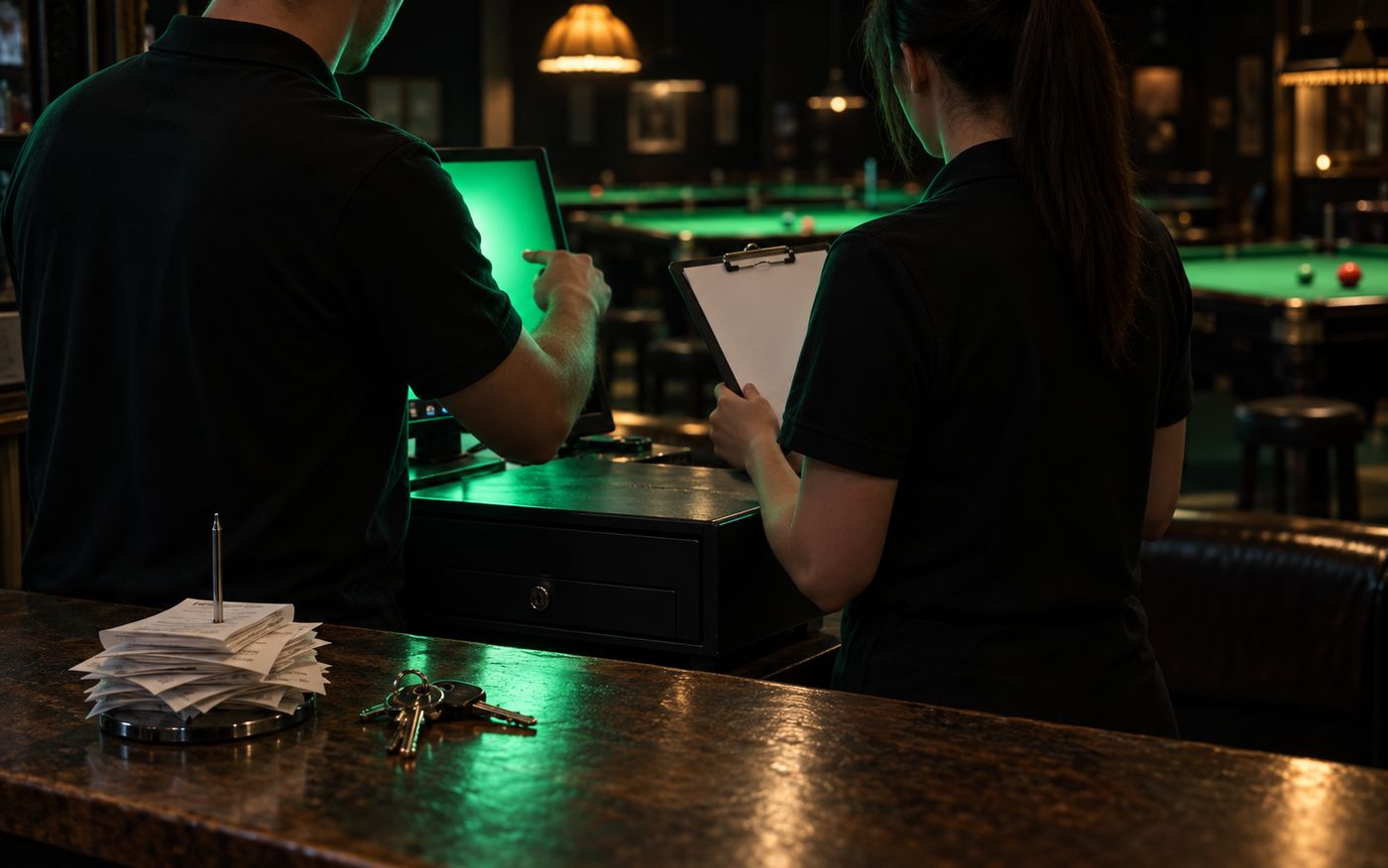
A shift handover behind a snooker club counter: takings checked, keys and receipts passed over

See it running in your own center